
Check-ins
Fast, Reliable Check-ins for Every Event
Long queues, missing tickets, duplicate scans, and confused door staff can quickly derail the attendee experience. FooEvents gives your team the tools to check people in quickly and confidently, whether you are running a simple event, a busy venue, or a complex multi-day setup.
Keep your entrance moving
Use the FooEvents Check-ins apps to scan tickets, validate attendees, and reduce delays at the door, helping your team manage event access quickly and professionally.
Scan QR codes and barcodes
Validate tickets using QR codes or barcodes on attendee tickets, so your team can confirm ticket status and check people in with a quick scan.
Find attendees fast
Search for attendees manually when a ticket cannot be scanned, making it easier to resolve entry issues without holding up the line.
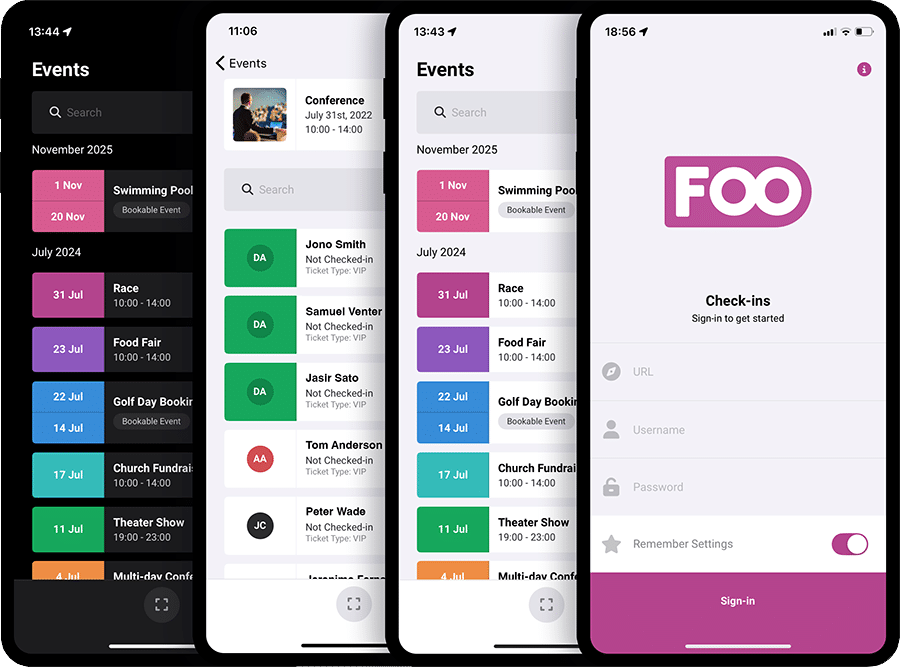
Check in attendees quickly and confidently
FooEvents helps you manage event entry using QR codes, barcodes, and the free FooEvents Check-ins apps. Your team can scan tickets, search for attendees, validate ticket status, track check-ins and check-outs, and help prevent duplicate entries, giving you a faster and more reliable check-in process at the door.
Kenmerken
Fast, Flexible Check-in Tools
See how FooEvents supports QR code scanning, manual attendee search, Express Check-in, offline check-ins, multi-device access, and more.
Flexible ticket check-ins
Validate and check in attendees for almost any type of event using tickets generated directly from WooCommerce orders.
QR code and barcode scanning
Scan ticket QR codes or barcodes from printed tickets or mobile screens using the FooEvents Check-ins app to quickly validate entry and update the attendee’s check-in status.
Manual attendee search
Search for attendees manually when they do not have their ticket available or their QR code cannot be scanned. This is available in the FooEvents Check-ins app and Express Check-in.
Real-time check-in status
See whether a ticket is valid, still available, or already checked in, so staff can make quick decisions at the door.
Duplicate check-in prevention
Prevent the same ticket from being used more than once and reduce the risk of copied, reused, or incorrect tickets being accepted.
Free iOS and Android check-ins app
Use the free FooEvents Check-ins apps for iOS and Android to manage event entry from phones and tablets at the door, registration desk, or event entrance.
Browser-based Express Check-in
Use FooEvents Snel inchecken to check in attendees from a fast, browser-based interface without needing the mobile app. Ideal for laptops, tablets, desktop registration desks, or teams that prefer a web-based workflow.
Standard event check-ins
Check in attendees for once-off events such as workshops, shows, conferences, fundraisers, parties, tours, and general admission events.
Booking slot check-ins
Manage check-ins based on the attendee’s selected booking date and time slot when using FooEvents Bookings. Ideal for tours, classes, appointments, activities, and scheduled experiences.
Multi-day event check-ins
Manage attendance across events that run over multiple days using FooEvents Meerdaags, such as conferences, festivals, retreats, expos, and training programs.
Seating check-ins
Validate tickets linked to specific seats when using FooEvents Stoel, so staff can confirm attendees are checked in for the correct seated event and ticket.
Multiple devices and staff
Use multiple devices with the FooEvents Check-ins app at different entrances, registration desks, or access points to speed up entry and reduce bottlenecks.
Offline check-ins
Continue checking in attendees with the FooEvents Check-ins app even when the internet connection is unreliable, then sync check-in data when a connection is available again.
Sync check-in data
Keep check-in records updated between the FooEvents Check-ins app and your WooCommerce store so attendance data stays aligned.
Event-specific ticket filtering
Filter tickets by event so staff only see the attendees relevant to the event they are working on. This is available in the FooEvents Check-ins app and Express Check-in.
Attendee details at the door
View important attendee information during check-in, including name, ticket details, event details, booking information, seat details, and order information. This is available in the FooEvents Check-ins app and Express Check-in.
Custom attendee field data
View additional attendee information collected during checkout when using FooEvents Custom Attendee Fields, such as dietary requirements, access needs, company names, T-shirt sizes, or event-specific details.
Browser-based check-ins
Check in attendees from a browser using WordPress admin tools or FooEvents Snel inchecken, giving event managers a flexible alternative to the mobile app.
Check-in lists
View attendee lists and manage check-in statuses from a centralized interface.
Filter past tickets
Control how many past tickets are loaded in the FooEvents Check-ins app, helping improve performance and keeping staff focused on relevant tickets.
Attendance tracking
Track which attendees arrived and which tickets were checked in for reporting, support, planning, and post-event follow-up.
Team access and permissions
Allow event staff to access check-in tools without giving them unnecessary control over the full WooCommerce store.
Order check-ins
Check in all tickets linked to the same order in one action, instead of scanning each attendee separately. This is ideal for tour operators, group bookings, family activities, and experiences where one person buys multiple tickets for a group arriving together.
Veelgestelde vragen
Frequently asked questions
Get answers to common questions about scanning tickets, using the Check-ins app, managing duplicate entries, and checking in attendees across different event types.
Can I check in attendees without using the mobile app?
Yes. FooEvents Express Check-in provides a browser-based check-in option, which is ideal for laptops, tablets, desktop registration desks, or teams that prefer not to use the mobile app.
Can I use multiple devices or staff members for check-ins?
Yes. Multiple staff members can use the FooEvents Check-ins app at different entrances, registration desks, or access points to help speed up entry and reduce queues.
What happens if the same ticket is scanned twice?
FooEvents shows the ticket’s check-in status, so staff can see if a ticket has already been checked in and help prevent duplicate entries.
Can I check in attendees for bookings, multi-day events, or seated events?
Yes. FooEvents supports check-ins for standard events, bookable events, multi-day events, and seated events, so you can manage attendance based on your event setup.
Which mobile phones work best with the FooEvents Check-ins app?
The FooEvents Check-ins app uses your phone’s camera and the operating system’s built-in scanning libraries. This means scanning speed and accuracy depend largely on the quality of the device, camera, and processor. In general, higher-end smartphones, especially newer iPhones, tend to perform best.
What languages does the FooEvents Check-ins app support?
The FooEvents Check-ins app currently supports English, Afrikaans, Arabic, Chinese (Simplified), Czech, Dutch, French, German, Greek, Hebrew, Hindi, Hungarian, Italian, Malay, Portuguese, Russian, Spanish, and Swedish.
You can change your language preferences in your device settings to use the app in one of the supported languages.
 English
  German
  Dutch
Dutch  Spanish
  Italian
  Portuguese
  French
  Polish
  Greek
Greek