
Conhecimentos
Tomar decisões informadas com base em relatórios de eventos e bilhetes
FooEvents provides real-time event and ticket reports which integrate seamlessly with your WooCommerce sales reports so you always know how your events are performing and can make informed data-driven business decisions.
Know how your event is performing
FooEvents gives you useful event data so you can track ticket sales, revenue, attendance, check-ins, check-outs, and overall event performance from your WordPress dashboard.
See what’s sold and what’s still available
View ticket totals, available tickets, and sales activity to understand demand, monitor capacity, and make better decisions before and during your event.
Track attendance activity
Review check-in and check-out information, including timestamps and activity data, so you can understand attendance patterns and keep better event records.
Run events directly from WooCommerce
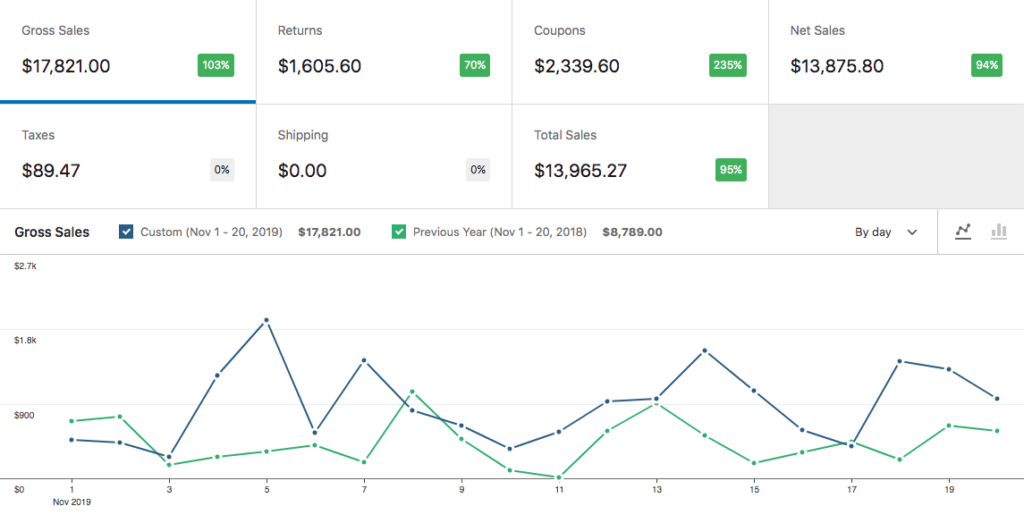
FooEvents turns WooCommerce products into fully functional events. This means you can use WooCommerce Analytics to track event revenue, monitor ticket sales, review order performance, compare sales over time, and better understand how your events are performing from your own WordPress website.
Características
Event Data You Can Actually Use
Explore the reporting, export, attendance, and WooCommerce data tools that help you understand performance and manage your events with confidence.
Event reports
View key event performance data such as revenue, tickets sold, check-ins, available tickets, and overall attendance activity.
Ticket sales tracking
Track how many tickets have been sold for each event and monitor remaining ticket availability.
Check-in reporting
Review attendee check-in totals to understand turnout and compare tickets sold against actual attendance.
Revenue reporting
Monitor event revenue and sales performance using FooEvents event reports and WooCommerce order data.
Análise WooCommerce
Use WooCommerce Analytics to view store performance, sales trends, revenue, orders, and product activity over time.
Online and in-person sales reporting
Track online and POS ticket sales through WooCommerce orders and reporting tools, depending on your sales setup.
Order management
Each ticket sale creates a WooCommerce order that is linked to the relevant tickets and includes billing details, customer information, and product data.
Linked tickets and orders
View the relationship between WooCommerce orders, tickets, and attendees so event and sales information stays connected.
Exportable data
Use WooCommerce and FooEvents exports to download order, attendee, ticket, and check-in data for reporting, reconciliation, or external analysis.
Perguntas mais frequentes
Frequently asked questions
Find answers about tracking attendance, exporting data, viewing sales reports, and using event information for planning and follow-ups.
What insights can I get from FooEvents?
FooEvents helps you track key event information such as ticket sales, attendee details, check-in status, booking details, seating allocations, and order activity. Since FooEvents works with WooCommerce, you can also use WooCommerce reports and compatible analytics tools to monitor revenue, sales trends, and customer activity.
Can I see who has checked in to my event?
Yes. You can track which attendees have checked in and which tickets are still unchecked. This makes it easier to monitor attendance during the event and review turnout afterwards.
Can I export attendee and ticket information?
Yes. FooEvents allows you to export attendee and ticket information, which can be useful for reporting, event planning, customer support, reconciliation, and sharing data with your team.
Can I view sales and revenue reports?
Yes. Ticket sales are processed through WooCommerce, so you can use WooCommerce’s built-in reporting tools, as well as compatible reporting and analytics extensions, to track sales, revenue, coupon usage, refunds, and order activity.
Where is my event data stored?
Your event, ticket, attendee, order, and customer data is stored on your own WordPress website. FooEvents does not store your customer data on an external FooEvents platform.
 English
  German
  Dutch
Dutch  Spanish
  Italian
  Portuguese
  French
  Polish
  Greek
Greek