

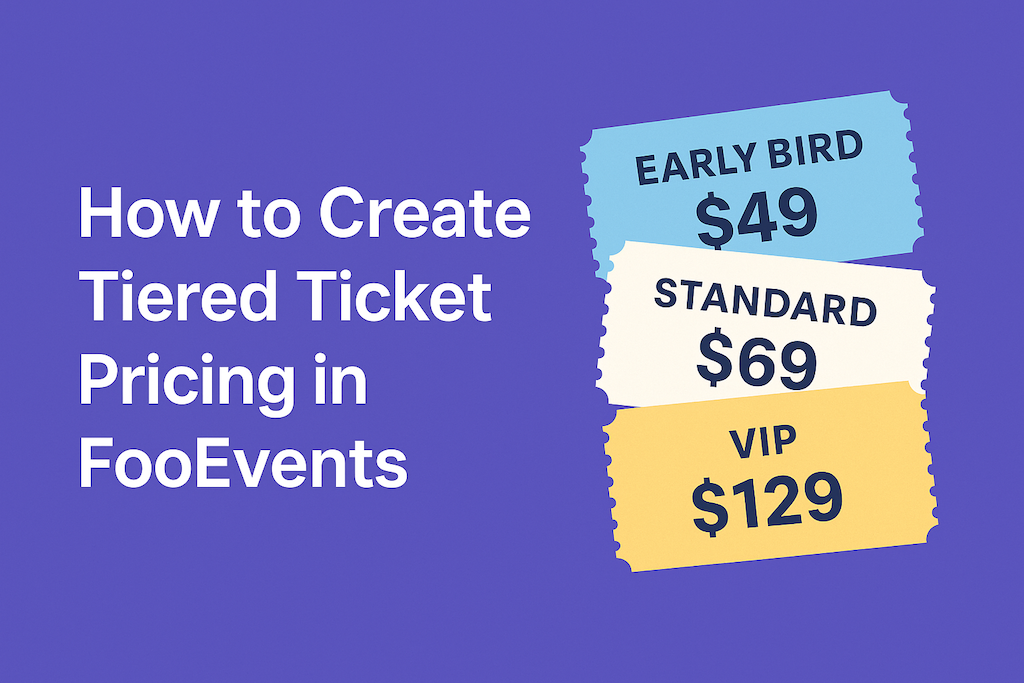
Il prezzo differenziato dei biglietti ti consente di offrire diversi tipi di biglietti, come Early Bird, Standard e VIP, senza plug-in aggiuntivi. Con FooEvents e WooCommerce, puoi creare livelli come varianti di prodotto, impostare prezzi e scorte per ogni livello e raccogliere i dettagli dei partecipanti per ogni biglietto. Questo post ti mostra come configurarlo e convalidarlo dall'inizio alla fine.
Introduzione
La maggior parte degli eventi trae vantaggio dall'avere più di un'opzione di prezzo. Early Bird premia le decisioni rapide, Standard copre la maggioranza e VIP aggiunge vantaggi premium. Poiché FooEvents si trova sopra WooCommerce, è possibile gestire ogni livello all'interno di un unico prodotto evento, senza pagine duplicate o report disordinati. Di seguito è riportata una configurazione pratica che è possibile seguire oggi stesso.
Nota: FooEvents attualmente utilizza Classic Checkout come impostazione predefinita. Se stai testando i blocchi di checkout WooCommerce, verifica il comportamento su un sito di staging prima di effettuare il passaggio.
Passaggio 1: Creare un prodotto evento
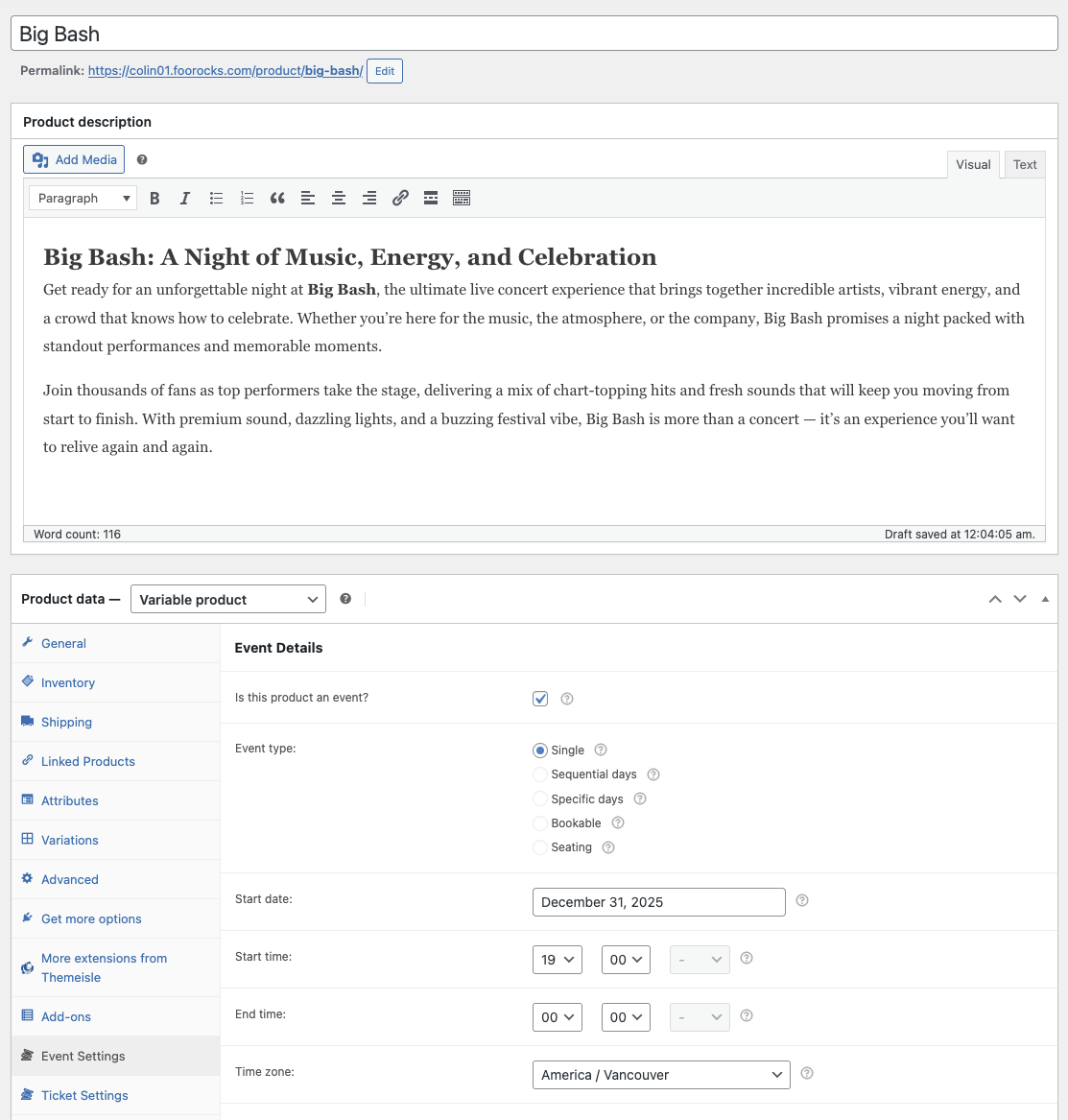
Nella dashboard di amministrazione WordPress, vai su Prodotti → Aggiungi nuovo e crea il tuo prodotto per l'evento.
- Assegna all'evento un titolo e una sintesi chiari (data, luogo, punti salienti).
- Imposta Dati del prodotto a Prodotto variabile (utilizzerai variazioni per i livelli di prezzo).
- Nel Impostazioni evento pannello, selezionare la casella Questo prodotto è un evento? e inserisci i dettagli dell'evento.
👉 Configurazione dell'evento (Aiuto)
Passaggio 2: aggiungere un attributo per “Tipo di ticket”
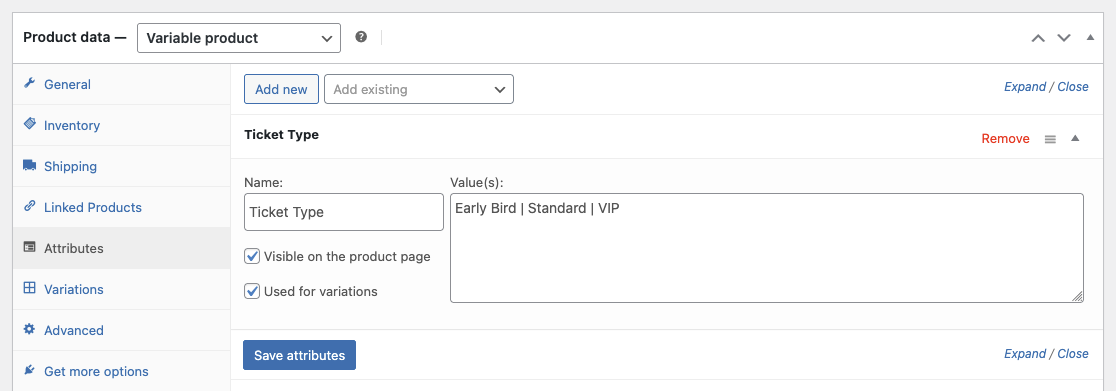
Gli attributi definiscono le opzioni su cui si basano le tue varianti (livelli).
- Nell'editor del prodotto, apri il file Attributi scheda.
- Crea un nuovo attributo personalizzato chiamato Tipo di biglietto.
- Inserisci valori come Prenotazione anticipata | Standard | VIP (separati da barre verticali).
- Controlla Utilizzato per le variazioni e clicca Salva gli attributi.
Fase 3: Generare varianti e impostare prezzi/scorte
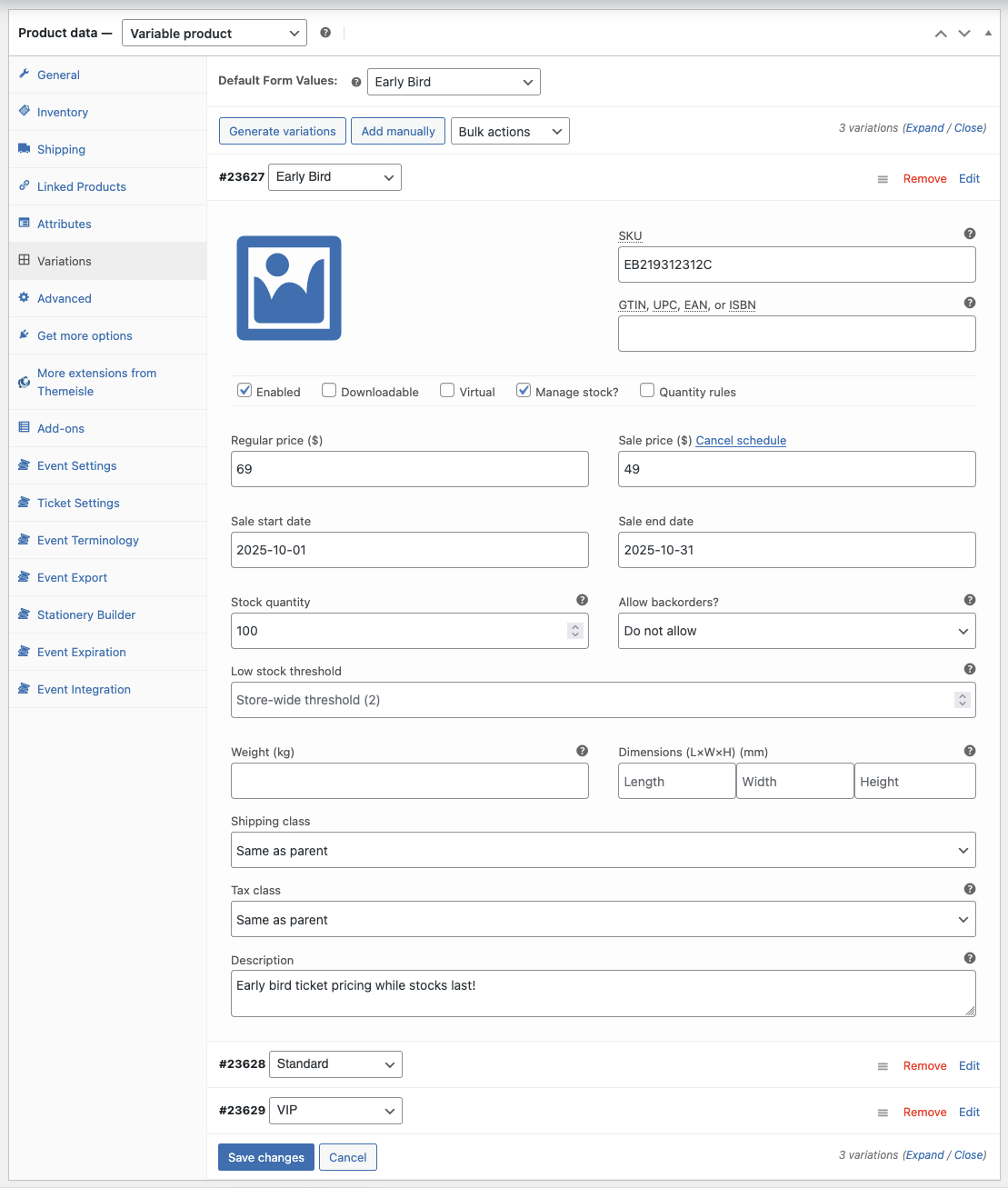
Ora converti i valori degli attributi in livelli effettivamente acquistabili.
- Vai al sito Variazioni scheda e seleziona Generare variazioni.
- Per ogni variazione (livello), impostare:
- Prezzo normale (ad esempio, Early Bird $49, Standard $69, VIP $129).
- Azioni (limitare l'offerta Early Bird per stimolare l'urgenza; VIP per preservare l'esclusività).
- Codice articolo (facoltativo) per mantenere ordinata la segnalazione.
- (Facoltativo) Utilizzo Programma sul prezzo di vendita della variante per terminare Early Bird in una data.
👉 Varianti del prodotto (Aiuto)
Fase 4: Raccogliere i dettagli dei partecipanti per ogni biglietto
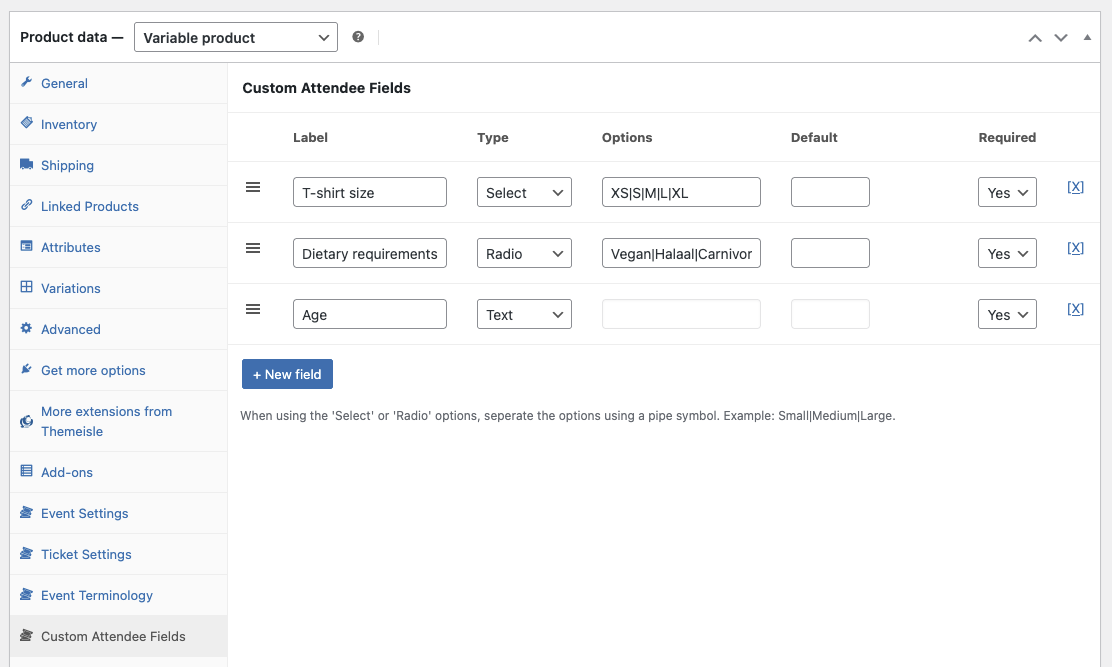
FooEvents può acquisire le informazioni dei partecipanti per ogni biglietto, il che è utile quando un unico ordine acquista più biglietti.
- Aprire la sezione Campi personalizzati per i partecipanti pannello.
- Cliccare +Nuovo campo.
- Aggiungi Campi personalizzati dei partecipanti se necessario (ad esempio, taglia della maglietta, esigenze alimentari, ecc.).
👉 Campi personalizzati dei partecipanti (Aiuto)
Passaggio 5: Pubblicare e convalidare il flusso
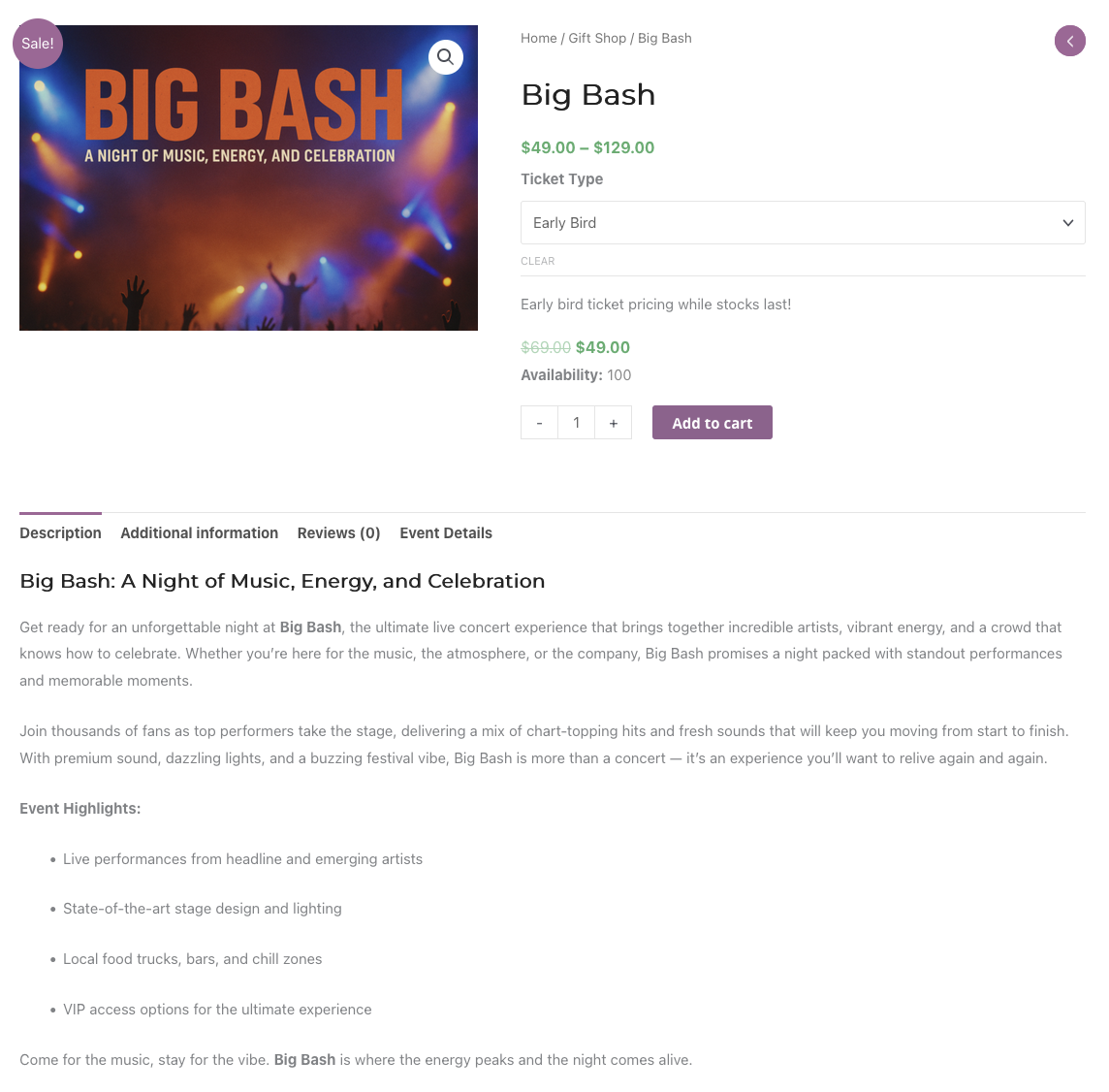
Visualizza l'anteprima del prodotto ed esegui un test rapido come farebbe un vero partecipante.
- Seleziona ogni livello e aggiungilo al carrello, verificando che il prezzo indicato sia corretto.
- Completa un ordine di prova e verifica che i dati dei partecipanti siano stati acquisiti per ogni biglietto.
- Controlla che l'e-mail del biglietto riporti il nome corretto del livello.
Passaggio 6: consigli pratici sui prezzi
- Usa la scarsità con attenzione: Limita la quantità disponibile per gli acquisti anticipati e/o fissa una scadenza per incoraggiare decisioni tempestive.
- Rendi evidente il valore: Aggiungi un breve elenco dei vantaggi nella descrizione di ciascuna variante (ad esempio, sala VIP, merchandising).
- Vendite aggiuntive in bundle: Considera un add-on VIP (ad esempio, una maglietta o un incontro con l'artista) per aumentare il margine di profitto.
- Monitoraggio delle prestazioni: Confronta gli ordini in base alle variazioni nei report; regola le scorte e i prezzi se un livello è in ritardo.
Nota: Se il tuo tema personalizza in modo significativo le pagine dei prodotti, prova la selezione dei livelli su dispositivi mobili per assicurarti che il menu a tendina e l'aggiornamento dei prezzi siano chiari.
FAQ
D. Ogni livello può avere domande diverse da parte dei partecipanti?
A. Sì. Utilizza i campi personalizzati dei partecipanti e rendi alcuni campi obbligatori per livelli specifici se la domanda è applicabile solo a quelli.
D. Come posso terminare automaticamente Early Bird?
A. Utilizzare la variazione Programma opzione per terminare un prezzo di vendita o azzerare le scorte alla data di scadenza.
D. Posso limitare il numero totale di biglietti per tutti i livelli?
A. Sì. Utilizza le scorte per variazione per controllare ogni livello oppure gestisci un limite massimo globale monitorando le vendite combinate e adeguando le scorte secondo necessità.
Conclusione
I prezzi differenziati dei biglietti ti aiutano a soddisfare diverse fasce di budget senza dover suddividere il tuo evento in più prodotti. Con le varianti FooEvents e WooCommerce, puoi controllare i prezzi, le disponibilità e i dati dei partecipanti per ogni fascia, mantenendo tutto in ordine per la reportistica e il check-in.
👉 Visita FooEvents o rivedere il Prodotti variabili WooCommerce documentazione per iniziare a creare i livelli dei tuoi biglietti.
 English
  German
  Dutch
Dutch  Spanish
  Italian
  Portuguese
  French
  Polish
  Czech
Czech  Greek
Greek