
Eventi
Turn your events into products that sell
Your events and services are digital products. This is the basic premise behind FooEvents and it’s what makes it possible to leverage WordPress and the WooCommerce ecosystem to create powerful event and ticketing websites in record time. No coding, no ticket fees, no commission!
Sell tickets from your own website
FooEvents lets you sell event tickets directly from your WordPress website, giving you full control over your checkout, customer data, payments, branding, and ticket revenue.
Create events for different formats
Run simple one-day events or build more advanced setups for conferences, classes, shows, sports fixtures, fundraisers, virtual events, and more.
No commission or ticket fees
Payments are processed through your chosen WooCommerce payment gateway, so there are no per-ticket commission fees from FooEvents.
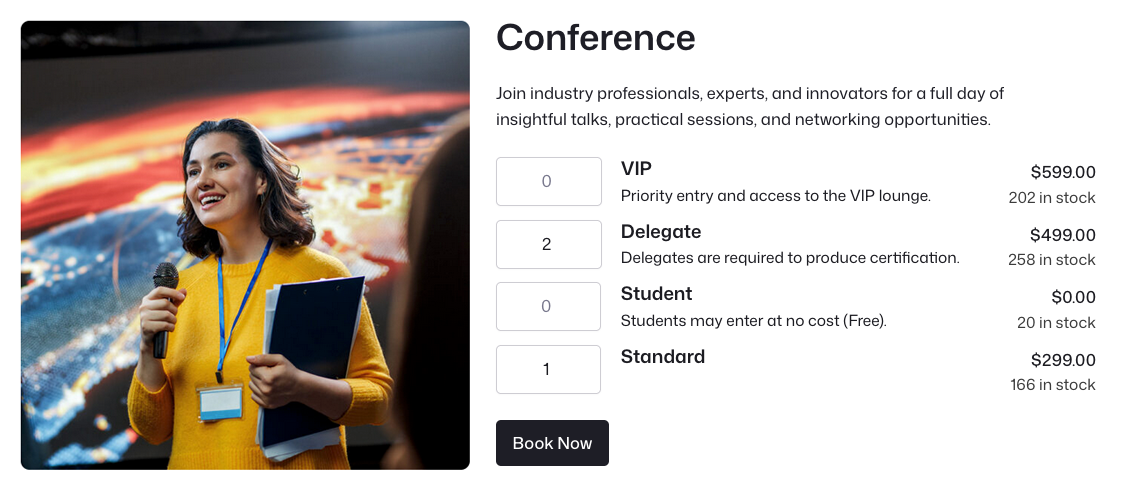
Run events directly from WooCommerce
FooEvents works differently from traditional event platforms by turning WooCommerce products into fully functional events. This means you can use the power and flexibility of WooCommerce to sell tickets, take bookings, manage attendees, accept payments, send tickets, and control the entire event experience from your own WordPress website.
Caratteristiche
Everything You Need
to Manage Events
1Explore the tools that help you create, configure, display, and manage events directly from your WooCommerce store.
Unlimited events and tickets
Create an unlimited number of events and sell unlimited tickets with any FooEvents license. Licenses are based on the number of websites where FooEvents is installed, not the number of events or tickets sold.
Sell tickets, products, and digital goods together
Use WooCommerce to sell event tickets, physical products, digital downloads, and other products from the same online store.
Support for free events
Vendete biglietti o registrate i partecipanti agli eventi gratuiti. I partecipanti riceveranno i biglietti e saranno registrati nel vostro sistema, il che è ottimo per costruire un database e per l'analisi post-evento.
Works with WooCommerce themes
FooEvents uses WooCommerce product templates, so your event pages work with most WooCommerce-compatible themes and can be customized to match your website.
Custom event pages
Each event has its own product page with a unique URL. Depending on your setup, event pages can include descriptions, images, event information, maps, ticket options, variations, and related products.
Custom event terminology
Replace default FooEvents wording with terms that match your event or industry. For example, change “attendees” to “participants,” “students,” “guests,” or “customers.”
Multilingual support
FooEvents includes language files for Afrikaans, Catalan, Czech, German, Spanish, French, Italian, Dutch, and Portuguese.
Custom translations
Modify the included translations or create your own custom language files to match your site’s language requirements.
Translation plugin compatibility
FooEvents is compatible with popular multilingual WordPress plugins including TradurrePress e WPML.
Runs on your own website
FooEvents runs on your own WordPress and WooCommerce website. Your event, customer, order, ticket, and attendee data stays in your own database.
Automatic event expiry
Set events to expire on a specific date. You can disable ticket sales or hide the event from your website once it has expired.
WordPress Multisite support
Use FooEvents on WordPress Multisite networks, allowing multiple sites or clients to create and manage their own events.
Calendari degli eventi
Display events in a calendar format using the Calendario FooEvents extension. Calendars can be added to posts and pages using shortcodes or widgets.
Bookable dates and time slots
Utilizzo FooEvents Prenotazioni to sell bookable events, venues, classes, appointments, tours, and services. Customers can view availability and book a date or time slot online.
Multi-day events and daily check-ins
Utilizzo FooEvents Multigiornaliero to sell tickets for events that run over multiple calendar or sequential days, with separate check-ins for each day.
Seating charts
Utilizzo FooEvents Posti a sedere to create visual seating charts where attendees can view available seats and select their own seats during the purchase process.
Demo events
Explore the FooEvents demos to see how different event types, booking setups, seating layouts, ticket options, and check-in workflows can be configured.
Labels, badges, and wristbands
Print custom name tags, wristbands, tickets, badges, and personalized labels using a drag-and-drop layout interface.
Domande frequenti
Got questions about
using FooEvents for events?
Find answers to common questions about creating events, choosing event types, and managing event settings in FooEvents.
Devo pagare commissioni o spese per i biglietti?
No! I biglietti e le prenotazioni vengono venduti direttamente dal vostro sito web e i pagamenti vengono elaborati tramite qualsiasi gateway di pagamento supportato da WooCommerce. Che vendiate 10 o 10.000 biglietti, tutte le entrate appartengono a voi!
Quanti biglietti posso vendere?
Tutte le licenze FooEvents consentono di creare un numero illimitato di eventi e biglietti senza costi aggiuntivi! Le licenze sono limitate solo al numero di siti web su cui FooEvents può essere installato.
Posso vendere anche prodotti fisici?
Sì, potete vendere biglietti, beni fisici e prodotti digitali dallo stesso sito web utilizzando la potente combinazione di FooEvents e WooCommerce.
Posso utilizzare l'FooEvents per eventi gratuiti?
Assolutamente sì. I partecipanti riceveranno i biglietti e saranno registrati nel vostro database WooCommerce, che è ottimo per creare un database CRM e gestire l'accesso agli eventi.
Posso modificare il design e il layout?
FooEvents funziona perfettamente con la maggior parte dei temi compatibili con WooCommerce, il che significa che avete innumerevoli opzioni tra cui scegliere per abbellire il vostro negozio e pubblicizzare i vostri eventi ai clienti. La pagina dell'evento utilizza i modelli WooCommerce, il che la rende facile da personalizzare e rendere propria.
Posso tradurre FooEvents in un'altra lingua?
Sì, è possibile modificare le traduzioni fornite con i plugin FooEvents o crearne di proprie. custom language files.
FooEvents è compatibile con i plugin di traduzione?
FooEvents è compatibile con TradurrePress e WPML, popolari plugin multilingue WordPress che consentono di tradurre i contenuti del sito web in più lingue.
Quali informazioni vengono visualizzate nella pagina dell'evento?
Ogni pagina dell'evento ha un URL unico che include la descrizione dell'evento, il riepilogo, la galleria di immagini, Google Map, le informazioni sull'evento, i menu a tendina delle variazioni e i prodotti correlati.
Posso usare termini diversi per il mio evento e per i partecipanti?
Yes, you can override the use of the FooEvents default terminology with your own wording so that it’s customized for your event. For example, you could change ‘Attendees’ to ‘Participants’, ‘Students’ or ‘Customers’.
Ci sono dipendenze esterne?
No. FooEvents è progettato per funzionare sul proprio sito web WooCommerce e non dipende da plugin di terze parti, servizi esterni o database. È sufficiente installare il plugin FooEvents, configurarlo e iniziare a vendere.
Posso far scadere automaticamente gli eventi?
Sì, potete impostare gli eventi in modo che scadano a una data specifica e potete scegliere di disattivare le vendite per l'evento o di nascondere l'evento dal vostro sito web alla data specificata.
Funziona con WP Multisite?
FooEvents supporta WordPress Multisite, che offre ai clienti la possibilità di creare e gestire i propri eventi e vendere i biglietti in una "rete" WordPress Multisite.
Posso visualizzare gli eventi in un calendario?
Sì, potete aggiungere calendari per i vostri eventi al vostro sito web. I calendari supportano vari temi e possono essere aggiunti ai vostri post e alle vostre pagine utilizzando semplici shortcode o widget.
Posso rendere gli eventi prenotabili per data e ora?
Sì, con l'estensione FooEvents Bookings potete vendere l'accesso a eventi, luoghi, corsi e servizi prenotabili. Lasciate che i vostri clienti controllino la disponibilità sul vostro sito web e prenotino un posto. Niente telefonate o e-mail, 100% self-service.
Il mio evento si svolge in più giorni, posso fare più check-in per ogni partecipante?
Sì, con l'estensione FooEvents Multi-day potete vendere biglietti plurigiornalieri che consentono ai partecipanti di accedere a un evento in più giorni di calendario o sequenziali, con check-in separati per ogni giorno.
L'FooEvents supporta le tabelle dei posti a sedere?
Sì, è possibile creare e gestire grafici visivi dei posti a sedere in cui i partecipanti possono vedere quali posti sono prenotati e selezionare i propri posti tra quelli disponibili utilizzando l'estensione FooEvents Seating.
 English
  German
  Dutch
Dutch  Spanish
  Italian
  Portuguese
  French
  Polish
  Greek
Greek