
Uitbreiding
FooEvents PDF Kaartjes
FooEvents PDF Tickets automatically attaches ticket and booking confirmations as PDF files to the emails sent to attendees or ticket purchasers. This gives customers a convenient ticket format that can be easily saved, downloaded, printed, or presented at the event.
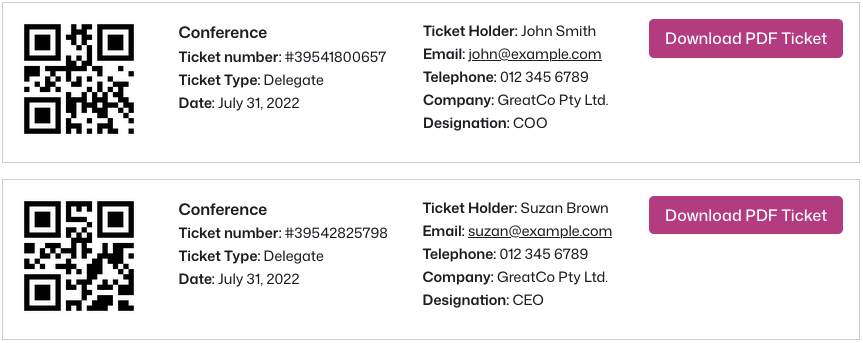
Send PDF tickets with FooEvents
Send PDF tickets with FooEvents emails.
Let attendees download tickets to save or print.
Attach booking confirmations as PDF files.
Use branded designs for polished event tickets.
14 dagen geld-terug-garantie
PDF ticket features that make delivery easier
Explore the key features that make FooEvents PDF Tickets a practical way to send professional, downloadable tickets and booking confirmations, from automatic email attachments and flexible delivery options to branded templates and easy customer downloads.
Easy PDF ticket setup
Start sending PDF tickets with your FooEvents ticket emails in just a few steps. Install the extension, enable PDF tickets, choose your preferred settings, and let FooEvents automatically generate PDF tickets when customers purchase tickets.
PDF tickets attached to emails
Automatically attach PDF tickets to the ticket emails sent to attendees after purchase. This gives customers a convenient downloadable ticket that they can save, print, or present at the event.
Single or multiple PDF files
Choose how PDF tickets are delivered when an order contains multiple tickets. Send each ticket as a separate PDF file, or include all tickets from the order in a single PDF document.
Works with HTML ticket emails
Use PDF tickets together with the default FooEvents HTML ticket emails. Attendees can view their ticket details directly in the email and also download or print the attached PDF version when needed.
Download tickets from My Account
Allow customers to access their PDF tickets from the Mijn account section of your WooCommerce website. This makes it easy for attendees to find and download their tickets again after purchase.
Print-friendly ticket format
Give attendees a simple, reliable PDF ticket format that can be saved or printed before the event. This is ideal for customers who prefer a physical ticket or need a backup copy.
Customizable ticket templates
PDF tickets are generated from HTML ticket templates, giving you flexibility to customize the layout, styling, branding, and ticket information. You can also use compatible FooEvents Ticket Themes to create a more polished ticket design.
Multilingual character support
PDF tickets support Western characters as well as Chinese, Japanese, and Korean characters, making them suitable for a wider range of events, languages, and audiences.
Download from the order confirmation page
Let customers download their PDF tickets directly from the WooCommerce order confirmation page after checkout. This gives attendees quick access to their tickets immediately after purchase, without needing to search their email inbox.
Licentiegegevens
Alles wat je nodig hebt om te slagen
Met elke FooEvents-licentie krijgt u toegang tot hoogwaardige tools, ondersteund door betrouwbare updates, toegewijde ondersteuning en duidelijke helpbronnen, zodat alles vanaf de eerste dag soepel verloopt.
Individueel kopen
Je kunt deze extensie ook los kopen, maar daarvoor is het hoofd FooEvents voor WooCommerce te installeren en activeren plugin.
Inbegrepen bij uw aankoop
- Downloadbare plugin-bestanden
- 12 maanden premium ondersteuning
- 12 maanden plugin-updates
- Gratis incheck-apps voor iOS en Android
- Gebruiksvriendelijke documentatie
Een licentie geeft recht op 12 maanden updates en ondersteuning vanaf de aankoopdatum. De licentie kan door jou of een klant worden gebruikt en kan niet worden doorverkocht of opnieuw gedistribueerd in de originele of gewijzigde staat. Alle aankoopopties worden jaarlijks gefactureerd, maar je kunt je abonnement op elk moment opzeggen. Als u niet tevreden bent met uw aankoop, bieden wij een 7-daagse geld-terug-garantie.
 English
  German
  Dutch
Dutch  Spanish
  Italian
  Portuguese
  French
  Polish
  Greek
Greek