
Aplikacja Check-ins
Przytrzymaj drzwi za pomocą bezpłatnej aplikacji FooEvents Check-ins
No more clumsy clipboards! Streamline your check-in process and ensure critical attendee, event, and booking information is at your fingertips when you need it most.
Attendees Checked In and Counting
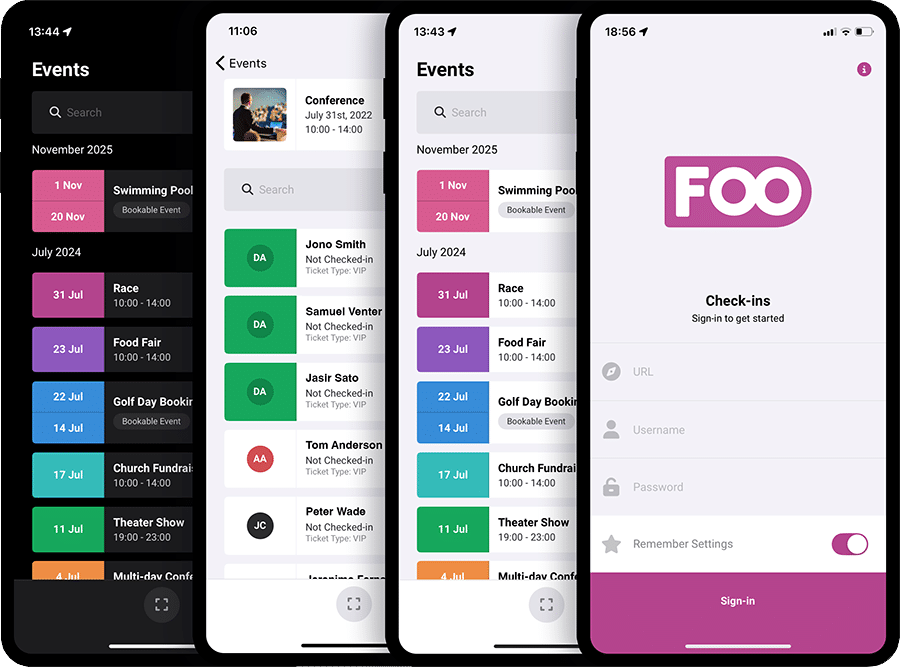
Check in attendees faster with the FooEvents Check-ins app
Scan tickets using QR codes or barcodes.
Check in attendees from iOS and Android devices.
Search for attendees when tickets cannot be scanned.
Track attendance with live and offline check-ins.
Download the apps for free!
Check-in app features built for busy event teams
Explore the key features that make the FooEvents Check-ins app a fast and flexible way to manage event entry, from QR code and barcode scanning to attendee search, offline mode, real-time updates, bulk status changes, booking check-ins, multi-day support, and tablet-friendly check-in workflows.
Fast QR Code and Barcode Scanning
Scan attendee tickets using your device’s built-in camera or a compatible Bluetooth barcode scanner. The FooEvents Check-ins app supports both QR codes and 1D barcodes, making it easy to validate tickets from printed tickets or mobile screens.
Automatyczne zameldowania
Speed up entry using Auto Check-ins. Once a ticket has been successfully scanned and validated, the attendee is automatically checked in and the app returns to the scanning screen, ready for the next ticket.
Real-time Check-ins
The app connects directly to your WordPress website, so check-ins can update in real time. This helps teams using multiple devices stay aligned and reduces the risk of duplicate or outdated check-in information.
Tryb offline
Keep checking in attendees even if your internet connection drops. The FooEvents Check-ins app can continue working offline and sync the check-in data once the connection is restored.
Elastyczne skanowanie zdarzeń
Scan tickets for a specific event or use global scanning to scan tickets from anywhere in the app. This makes it easier to manage check-ins across different event setups and busy entrance points.
Attendee Search
Quickly find attendees by searching for their name or ticket ID. This is useful when an attendee does not have their ticket ready or their QR code cannot be scanned.
Filtry i sortowanie
Filter and sort events and attendees to keep large lists organized. This helps staff find the right event, ticket, or attendee faster, especially at busy venues.
Ograniczone wyświetlanie zdarzeń
Control which events appear in the app. You can show all published events, only events created by the signed-in user, or selected events that you choose in advance.
Tablet-optimized Interface
The FooEvents Check-ins app is optimized for iPad and tablet devices, giving your team more screen space to view attendee information, manage check-ins, and work faster on-site.
Event List Display Options
Choose how events are displayed in the app using featured images or date-based list styles. The date mode uses customizable, color-coded date icons to help staff quickly identify events.
Swipe Actions
Check in, check out, or cancel attendee access directly from the attendee list by swiping right on an attendee’s name.
Zbiorcze aktualizacje statusu
Update multiple tickets at once by selecting attendees and marking them as checked in, checked out, or canceled. This is useful for managing groups or correcting several ticket statuses quickly.
Wyświetl informacje o uczestnikach
View attendee details directly in the app, including custom attendee fields captured during checkout. This helps staff access important information without switching systems.
Tryb prywatności
Hide personal attendee and ticket purchaser information in the app. Only attendee names are shown for check-in purposes, helping protect sensitive customer data during event operations.
Dziennik odpraw
View a check-in activity log for each individual ticket. This gives event teams a clearer record of when ticket status changes were made.
Multi-day Event Support
When using FooEvents Multi-day, attendees can be checked in across multiple event days, making the app suitable for conferences, festivals, retreats, and other multi-day events.
Zarządzanie rezerwacjami
When using FooEvents Bookings, the Check-ins app provides booking-specific screens that make it easier to manage attendance for bookable events, sessions, time slots, tours, classes, and appointments.
Custom Branding
Customize the app logo and color scheme from your FooEvents plugin settings. Branding is managed centrally, so connected apps automatically use your chosen look and feel.
Terminologia niestandardowa
Customize key terms used in the app, such as “Events,” “Attendees,” and “Check-ins,” so the app matches the language used by your business or venue.
Tryb ciemny
Use dark mode to reduce screen glare, improve comfort in low-light environments, and help save battery life during long events.
Bluetooth Scanner Support
Pair your device with a handheld Bluetooth barcode scanner for faster, hardware-assisted scanning at busy entrances or registration desks.
Obsługa wielu języków
The FooEvents Check-ins app supports 18 languages, including English, Afrikaans, Arabic, Chinese (Simplified), Czech, Dutch, French, German, Greek, Hebrew, Hindi, Hungarian, Italian, Malay, Portuguese, Russian, Spanish, and Swedish.
 English
  German
  Dutch
Dutch  Spanish
  Italian
  Portuguese
  French
  Polish
  Greek
Greek