
Konferencje
Sell tickets and manage conference attendees
Organizing a conference can be pretty stressful – selling tickets doesn’t have to be. FooEvents has helped thousands of event organizers sell millions of tickets directly from their own WordPress websites. No coding, no ticket fees, no commission!
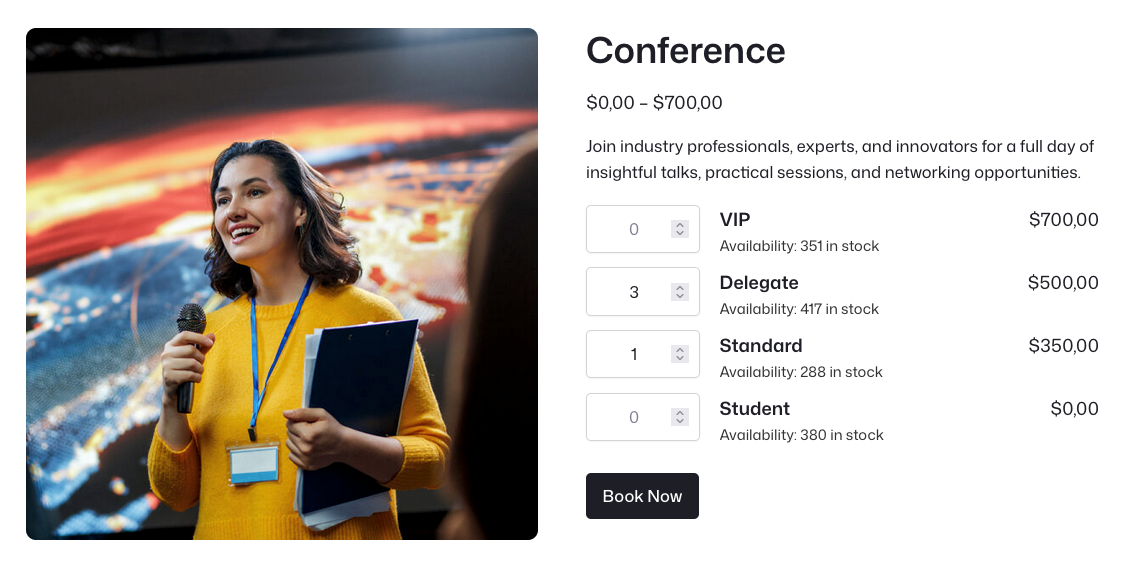
Sell and manage conference tickets with confidence
Sprzedaż biletów directly through WooCommerce.
Manage registrations and attendee records.
Collect details with custom attendee fields.
Check in delegates using the free FooEvents app.
Single-day conferences
Sell tickets for one-day conferences, seminars, summits, and industry events with a clear event date, time, venue, ticket options, and attendee check-in workflow.
Multi-day conferences
Support events that run over several days using FooEvents Multi-day, including day-specific details, ticket display options, and separate check-ins per day.
Virtual conferences
Connect FooEvents with Zoom to register attendees for online conferences, webinars, training events, and virtual presentations when they purchase tickets.
Workshops and breakout sessions
Use FooEvents Bookings to sell bookable sessions, workshops, time slots, or smaller group activities as part of a larger conference program.
Recurring sessions
Create conference-style workshops, training days, or speaker sessions that take place on selected dates without rebuilding the event from scratch each time.
Hybrid conferences
Offer both in-person and virtual ticket options so attendees can choose how they want to take part while you manage everything through WooCommerce.
Conference formats
Jednodniowe, wielodniowe, wirtualne, cykliczne?
We’ve got you covered!
FooEvents is flexible enough to support simple one-day conferences as well as more advanced event formats with multiple days, virtual access, workshops, and hybrid attendance.
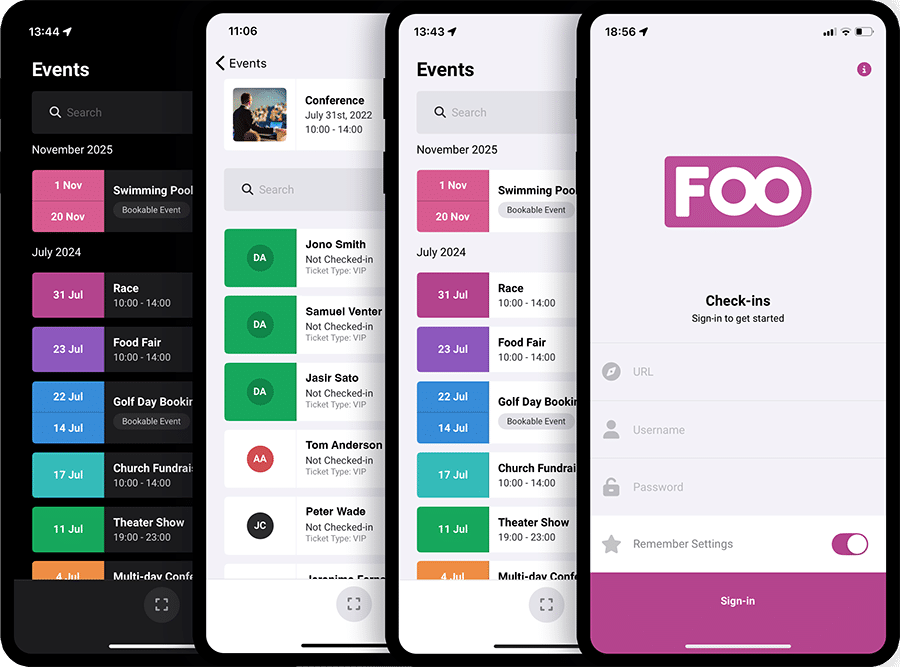
Manage conference check-ins
Keep registration desks and entry points moving
Use the free FooEvents Check-ins app to validate conference tickets, check in delegates, track attendance, and manage access across sessions, workshops, and event days. Whether you are running a small seminar or a large multi-day conference, your team can check attendees in quickly using mobile devices.
Who it helps
Conference tools for different teams
Whether you are organizing your own event or building a conference website for a client, FooEvents gives you practical tools that fit the way WordPress and WooCommerce teams already work.
Event organizers and small businesses
Sell tickets, manage registrations, send tickets, and check in attendees from your own website without relying on a separate ticketing platform.
Designers, developers, and agencies
Use familiar WooCommerce products, variations, orders, templates, hooks, and integrations to create flexible conference registration workflows.
Nonprofit organizations
Run conferences, fundraising events, training sessions, and community gatherings while keeping costs down and avoiding third-party ticketing fees.
Conference features
Key FooEvents features for conferences
Explore the conference-friendly features that help you sell tickets, manage registrations, communicate with attendees, run check-ins, support virtual sessions, and keep your event data under your control.
Conference ticket sales
Sell conference tickets directly through WooCommerce using your existing cart, checkout, payment gateways, taxes, coupons, customer accounts, and order workflows.
No commission or ticket fees
Keep more of your revenue by selling tickets from your own website without paying per-ticket commissions to a third-party ticketing platform.
Multiple ticket types
Create ticket options such as General Admission, VIP, Early Bird, Student, Member, Speaker, Sponsor, Exhibitor, or Virtual Access using WooCommerce variations.
Capacity and stock control
Manage conference capacity using WooCommerce stock settings so you can control ticket availability and reduce the risk of overselling.
Attendee detail capture
Użyj Niestandardowe pola uczestników FooEvents extension to collect custom attendee information your conference needs, such as names, company details, dietary requirements, accessibility requests, session choices, or consent confirmations.
Branded ticket emails
Wyślij professional HTML ticket emails that include conference details, attendee information, QR codes, barcodes, calendar links, and your event branding.
Bilety PDF
Użyj Bilety FooEvents PDF extension to attach downloadable PDF tickets and booking confirmations to ticket emails so attendees can save, print, or present their tickets when they arrive.
Add to Calendar support
Include calendar links and ICS attachments in ticket emails so attendees can add conference dates and reminders to their calendar apps.
Multi-day schedule support
Użyj FooEvents Wielodniowy extensionto manage conferences that run across multiple days and display relevant date information on tickets, emails, reports, and attendee records.
Workshop and session bookings
Let attendees book specific sessions, workshops, training slots, or breakout activities using FooEvents Rezerwacje.
Spotkania i seminaria internetowe Zoom
Create or assign Zoom meetings and webinars and automatically register attendees when they purchase virtual conference tickets.
Hybrid event support
Sell in-person and virtual attendance options for the same conference while keeping tickets, orders, and attendee data connected in WooCommerce.
Reserved seating
Use FooEvents Seating when your conference includes assigned seating for talks, awards evenings, gala dinners, or theatre-style venues.
Mobile check-ins
Use the free Aplikacje FooEvents Check-ins for iOS and Android to scan QR codes or barcodes, validate tickets, search attendees, and manage entry.
Offline check-ins
Keep checking attendees in when venue internet is unreliable, then sync check-in data once the device reconnects.
Door sales and on-site registration
Użycie FooEvents POS lub FooSales to sell tickets in person at the registration desk, box office, or venue entrance.
Badges and stationery
Design and print name tags, badges, wristbands, labels, and physical tickets using the FooEvents Stationery Builder.
Attendee exports
Export attendee and ticket data to CSV for planning, registration desks, sponsor lists, reporting, communication, or use with other tools.
Event reports and insights
View ticket sales, revenue, tickets sold, available tickets, check-ins, check-outs, and performance reports from inside WordPress.
Conference calendar display
Use FooEvents Calendar to display conference dates, sessions, workshops, or related events in a calendar or list view.
Email and automation workflows
Connect FooEvents with tools such as Mailchimp and AutomateWoo to support attendee communication, reminders, follow-ups, and event automation.
Private data ownership
Keep customer, order, attendee, and ticket data in your own WordPress and WooCommerce database instead of handing it to a hosted ticketing platform.
 English
  German
  Dutch
Dutch  Spanish
  Italian
  Portuguese
  French
  Polish
  Greek
Greek