
Koncerty i pokazy
Ticketing for concerts and live performances
Selling tickets to a concert, show, performance, theatre production, or music festival should not mean giving up control of your revenue or audience. FooEvents lets you sell tickets directly from your WordPress website using WooCommerce. No coding, no ticket fees, no commission!
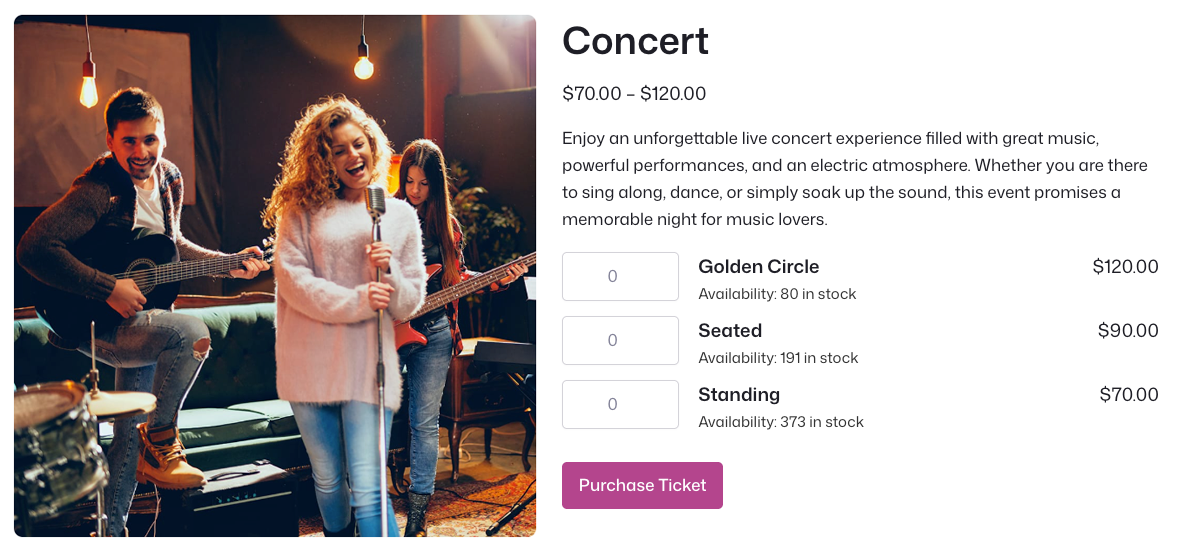
Sell concert and show tickets with confidence
Sprzedaż biletów directly through WooCommerce.
Manage capacity for shows, dates, and ticket types.
Send tickets with barcodes, QR codes, and event details.
Check in attendees using the free FooEvents app.
Once-off concerts
Sell tickets for once-off concerts, album launches, live performances, comedy nights, and special shows with a clear date, time, venue, ticket options, and check-in workflow.
Multi-day music festivals
Support festivals and multi-day music events using FooEvents Multi-day, including day-specific details, ticket display options, and separate check-ins per day.
Theatre shows and cinemas
Let attendees choose their own seats for theatre shows, movie screenings, musicals, comedy nights, and seated performances using visual seating charts.
Music shows and performances
Sell tickets for repeat or once-off shows, from small venue performances to larger productions with different ticket types, dates, and access rules.
School musicals and events
Sell tickets to school productions, concerts, plays, prize-givings, and events directly from the school’s WordPress website.
Concert tours and recurring shows
Manage tours, recurring performances, drive-in screenings, and shows that take place across different dates, venues, or time slots.
Concert and show formats
Concerts, theatre, festivals, tours?
We’ve got you covered!
FooEvents is flexible enough to support once-off concerts, theatre shows, school productions, festivals, tours, recurring performances, and bookable show dates.
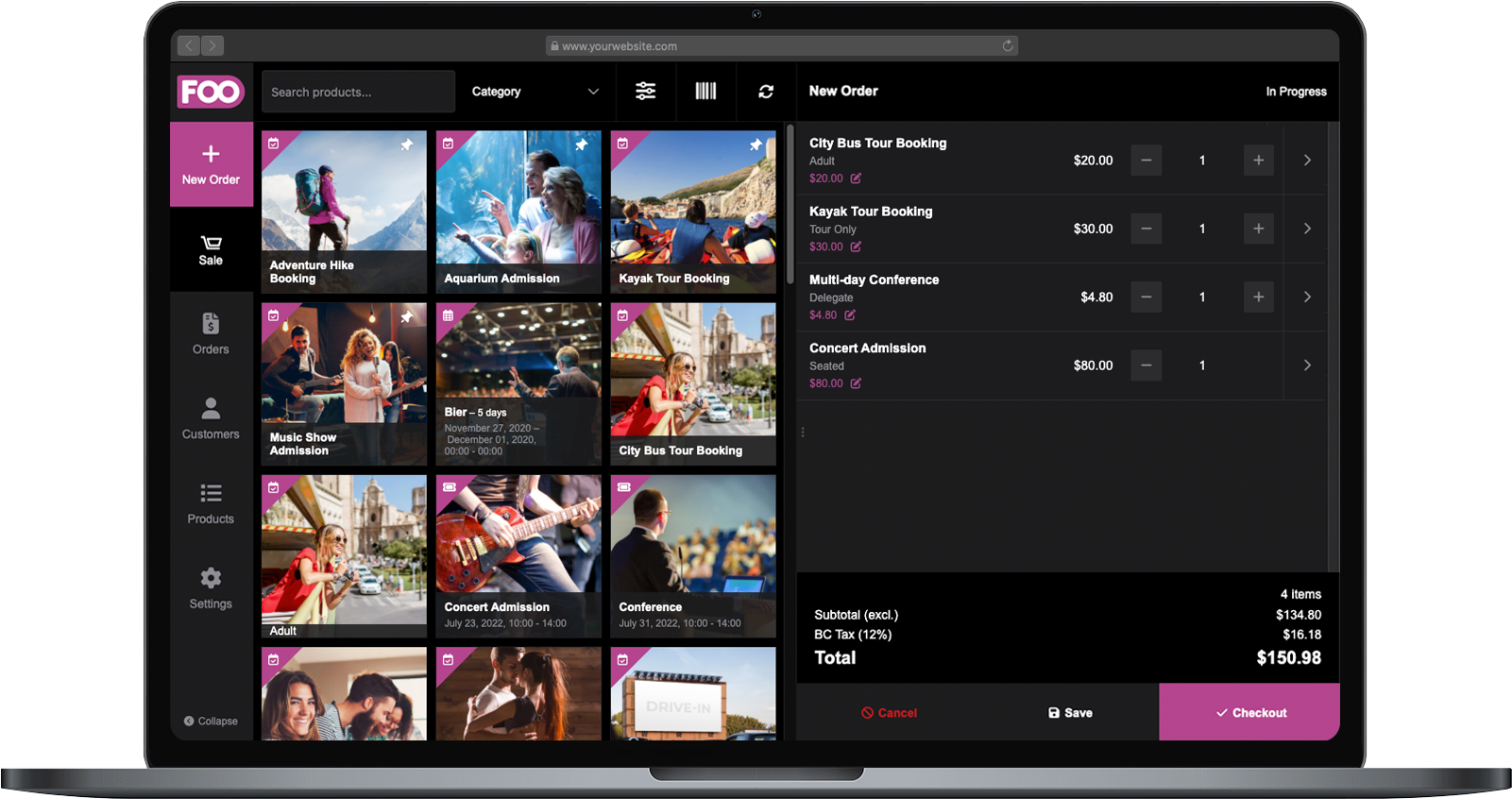
Take ticket sales from online checkout to the box office
Use FooEvents POS to sell tickets and passes in person for concerts, theatre shows, comedy nights, school productions, live performances, music festivals, movie screenings, and venue events. Sell at the door, print tickets on-site, and keep online and in-person sales connected through WooCommerce.
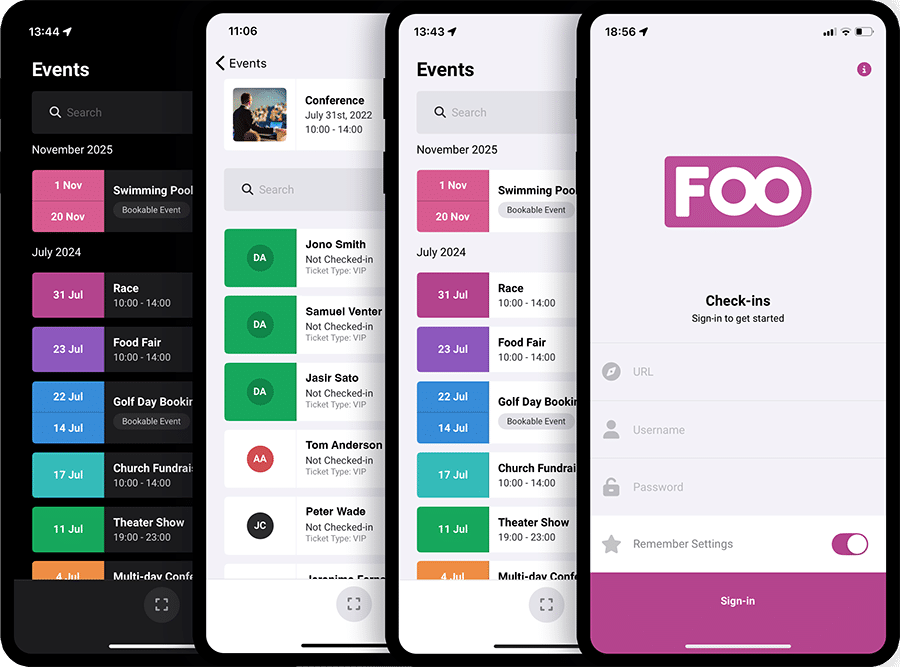
Manage concert and show check-ins
Keep queues moving and seats filling
Use the free FooEvents Check-ins app to validate tickets, check in guests, track attendance, and manage access at the door. Whether you are running a concert, theatre show, comedy night, school production, or live performance, your team can scan tickets quickly using mobile devices and keep entry running smoothly.
Who it helps
Ticketing tools for different event teams
Whether you are running your own venue, organizing a production, or building a ticketing website for a client, FooEvents gives you practical tools that fit the way WordPress and WooCommerce teams already work.
Promoters, venues, and event organizers
Sell tickets, manage capacity, send tickets, and check in guests from your own website without relying on a separate ticketing platform.
Designers, developers, and agencies
Use familiar WooCommerce products, variations, orders, templates, hooks, and integrations to create flexible concert and show ticketing workflows.
Schools, theatres, and performance groups
Sell tickets for school musicals, theatre productions, community shows, screenings, and fundraising performances while keeping costs down.
Concert and show features
Key FooEvents features for concerts and shows
Explore the concert and show-friendly features that help you sell tickets, manage capacity, send branded tickets, scan guests at the door, support reserved seating, and keep your event data under your control.
Concert and show ticket sales
Sell concert, show, theatre, cinema, festival, and performance tickets directly through WooCommerce using your existing cart, checkout, payment gateways, taxes, coupons, customer accounts, and order workflows.
No commission or ticket fees
Keep more of your revenue by selling tickets from your own website without paying per-ticket commissions to a third-party ticketing platform.
Multiple ticket types
Create ticket options such as General Admission, VIP, Standing, Seated, Balcony, Student, Pensioner, Early Bird, Backstage, Free, or Sponsor tickets using WooCommerce variations.
Capacity and stock control
Manage event capacity using WooCommerce stock settings so you can control ticket availability for each show, performance, date, or ticket type.
Attendee and guest details
Collect the attendee information your event needs, such as guest names, contact details, accessibility requests, age confirmations, performer notes, seating preferences, or custom questions.
Branded ticket emails
Send professional HTML ticket emails that include show details, attendee information, QR codes, barcodes, calendar links, and your event branding.
Bilety PDF
Attach downloadable PDF tickets to ticket emails so guests can save, print, or present their tickets when they arrive at the venue.
Add to Calendar support
Include calendar links and ICS attachments in ticket emails so guests can add show dates and reminders to their calendar apps.
Multi-day festival support
Using FooEvents Wielodniowy, manage festivals, tours, and productions that run across multiple days, and display relevant date information on tickets, emails, reports, and attendee records.
Bookable show dates and time slots
Let guests select specific show dates, time slots, screenings, matinees, performances, or bookable sessions using FooEvents Bookings.
Virtual performances and streaming access
Sell access to virtual shows, livestreams, online performances, and private viewing links when your event includes a digital attendance option.
In-person and virtual ticket options
Sell in-person and virtual access for the same event while keeping tickets, orders, and attendee data connected in WooCommerce.
Reserved seating
Użycie FooEvents Siedzenie when your show includes assigned seating for theatres, cinemas, auditoriums, concert halls, gala evenings, or seated performances.
Mobile check-ins
Use the free Aplikacje FooEvents Check-ins for iOS and Android to scan QR codes or barcodes, validate tickets, search guests, and manage entry.
Offline check-ins
Keep checking guests in when venue internet is unreliable, then sync check-in data once the device reconnects.
Door sales and box office tickets
Użycie FooEvents POS lub FooSales to sell tickets in person at the box office, venue entrance, merchandise table, or ticket desk.
Printed tickets and stationery
Design and print physical tickets, labels, wristbands, name tags, access passes, and other event stationery using the FooEvents Stationery Builder.
Attendee exports
Export attendee and ticket data to CSV for box office planning, access control, reporting, guest lists, communication, or use with other tools.
Event reports and insights
View ticket sales, revenue, tickets sold, available tickets, check-ins, check-outs, and event performance reports from inside WordPress.
Event calendar display
Use FooEvents Calendar to display concerts, shows, performances, screenings, or related events in a calendar or list view.
Email and automation workflows
Connect FooEvents with tools such as Mailchimp and AutomateWoo to support attendee communication, reminders, follow-ups, and event automation.
Private data ownership
Keep customer, order, attendee, and ticket data in your own WordPress and WooCommerce database instead of handing it to a hosted ticketing platform.
 English
  German
  Dutch
Dutch  Spanish
  Italian
  Portuguese
  French
  Polish
  Greek
Greek