
Uitbreiding
FooEvents Kalender
FooEvents Calendar makes it easy to showcase upcoming events using simple shortcodes or blocks, as well as turn posts, pages, and custom post types into calendar events.
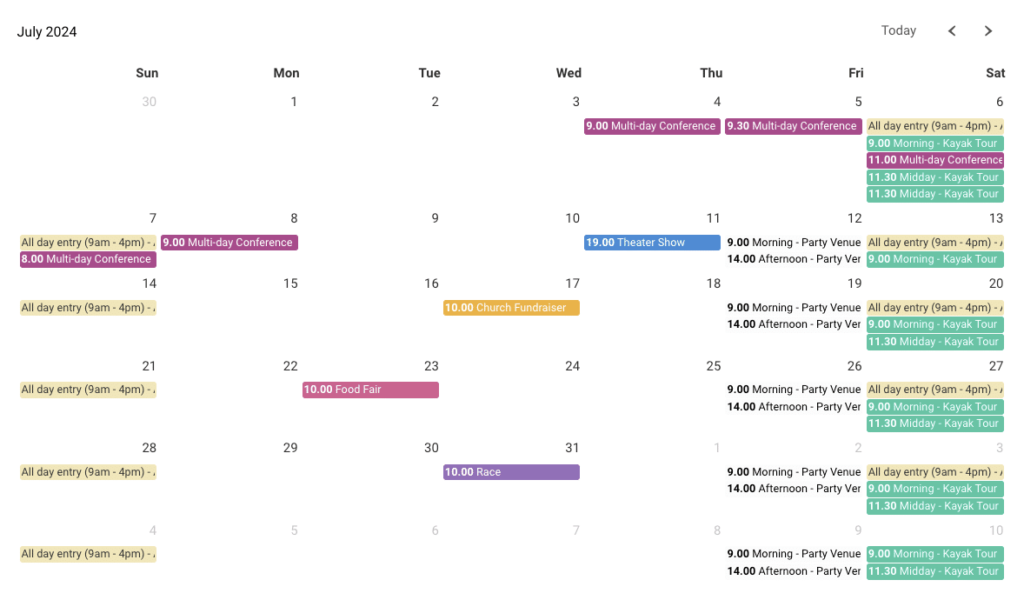
Display events in a WordPress calendar
Display events in calendar and list views.
Help visitors browse events by date.
Link event listings to ticket pages.
Customize calendar views to match your site.
14 dagen geld-terug-garantie
Calendar features for better event discovery
Explore the key features that make FooEvents Calendar a flexible way to display events on your WordPress website, from stylish calendar layouts and shortcode placement to event page links, multi-day event support, and compatibility with FooEvents-powered ticket sales.
Multi-day event support
Display events that run across multiple days, helping visitors understand longer schedules such as festivals, conferences, retreats, workshops, and training programs.
Flexible event sources
Turn posts, pages, products, or custom post types into events and display them in a calendar without changing how your site is structured.
Calendar and list views
Show events in a traditional calendar layout or a clean list format, making it easier for visitors to browse events by day, week, month, or year.
Shortcode and block support
Add calendars anywhere on your site using shortcodes, or the FooEvents Calendar block.
Multiple calendars per page
Display different calendars on the same page, each with its own settings, filters, or event selection.
Category and event filtering
Show specific events by category or post ID, making it easy to create calendars for venues, departments, event types, or audiences.
Built-in calendar themes
Choose from ready-made styles including Default, Light, Dark, Flat, and Minimalist to better match your website design.
Custom event colors
Set custom background and text colors for event labels, helping visitors quickly identify different event types.
Event list themes
Use styled list layouts, including light and dark card designs, for a more compact schedule view.
Booking slot display
When used with FooEvents Bookings, display bookable slots directly in the calendar so customers can view available dates and times.
Ticket availability display
Show the number of tickets or booking slots remaining, helping visitors see availability before clicking through.
Full-day event mode
Hide event times when they are not needed, which is useful for all-day activities, public holidays, exhibitions, and general admission events.
Time format control
Display event times in either 12-hour or 24-hour format to match your audience and regional preferences.
Week and weekend controls
Choose whether the calendar starts on Sunday or Monday, and hide weekends when events only take place during the working week.
Default date control
Set the calendar to open on a specific past or future date instead of always loading the current month.
Eventbrite integration
Import events from Eventbrite and submit events to Eventbrite when the integration is configured.
Licentiegegevens
Alles wat je nodig hebt om te slagen
Met elke FooEvents-licentie krijgt u toegang tot hoogwaardige tools, ondersteund door betrouwbare updates, toegewijde ondersteuning en duidelijke helpbronnen, zodat alles vanaf de eerste dag soepel verloopt.
Individueel kopen
You can also purchase support for this extension on its own, but it requires the main FooEvents voor WooCommerce te installeren en activeren plugin.
Inbegrepen bij uw aankoop
- Downloadbare plugin-bestanden
- 12 maanden premium ondersteuning
- Gratis incheck-apps voor iOS en Android
- Gebruiksvriendelijke documentatie
Een licentie geeft recht op 12 maanden updates en ondersteuning vanaf de aankoopdatum. De licentie kan door jou of een klant worden gebruikt en kan niet worden doorverkocht of opnieuw gedistribueerd in de originele of gewijzigde staat. Alle aankoopopties worden jaarlijks gefactureerd, maar je kunt je abonnement op elk moment opzeggen. Als u niet tevreden bent met uw aankoop, bieden wij een 7-daagse geld-terug-garantie.
 English
  German
  Dutch
Dutch  Spanish
  Italian
  Portuguese
  French
  Polish
  Greek
Greek