
Eventbrite makes it easy to start selling tickets. You create an event, publish it and the sales come in. The cost only becomes clear when the payout arrives, and you see how much of each ticket never reached your bank account.
If you sell a few dozen tickets a year, that may not matter much. If you run a regular event series, a conference or a busy venue, per-ticket fees add up to thousands of dollars every year. In this guide we break down exactly what Eventbrite charges in the US, compare it with selling tickets on your own WooCommerce site using FooEvents, and show you the point at which switching pays for itself.
How Eventbrite fees work
Eventbrite is free for free events. For paid tickets, US organizers pay two separate fees:
- Service fee: 3.7% of the ticket price plus $1.79, charged on every paid ticket.
- Payment processing fee: 2.9% of each order.
By default, Eventbrite adds these fees to the price your buyers see at checkout. A $40 ticket therefore costs your attendee around $44.50. You can choose to absorb the fees instead, so buyers pay $40 and the fees come out of your payout.
Neither option makes the fees disappear. If you pass them on, your attendees pay more and your event looks more expensive than its listed price. If you absorb them, you keep less of every sale.
Eventbrite also offers a Pro plan, starting at $15 a month, which increases how many marketing emails you can send. It does not lower the per-ticket fees.
Fees vary by country. If you sell in another currency, check Eventbrite’s fee guide for your region.
What that looks like on a single ticket
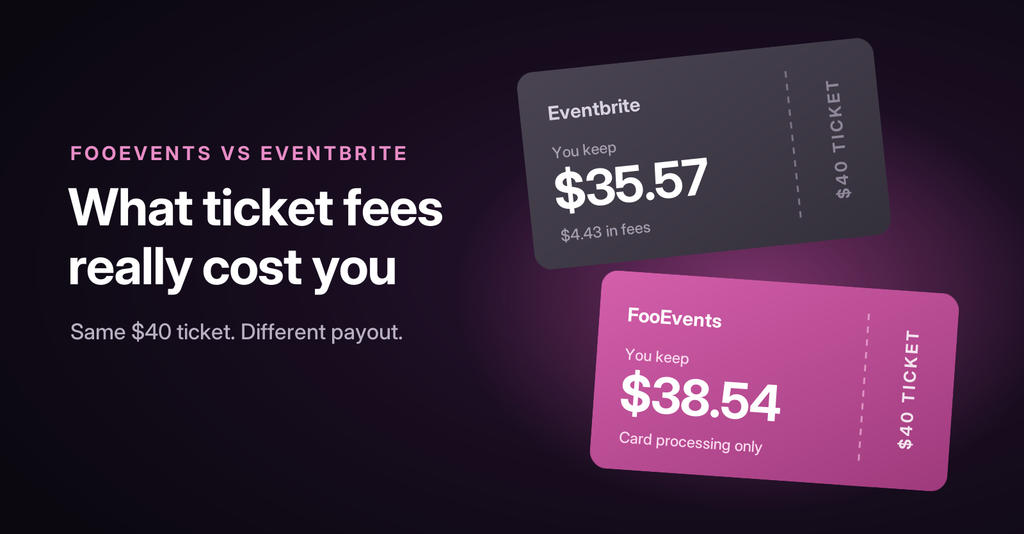
Here is what Eventbrite takes from one $40 ticket when you absorb the fees:
| Line item | Amount |
|---|---|
| Ticket price | $40.00 |
| Service fee (3.7% + $1.79) | $3.27 |
| Payment processing (2.9%) | $1.16 |
| Total fees | $4.43 |
| You receive | $35.57 |
That is just over 11% of every ticket, before you have spent anything on marketing, staff or your venue.
How FooEvents pricing works
FooEvents takes a different approach. Instead of taking a cut of every ticket, you pay once a year for a licence and sell as many tickets as you like through your own WooCommerce store.
| Pakiet | Cena | Best for |
|---|---|---|
| Basic | $169/year | Single-date events with calendar listings and express check-in |
| Rezerwacje | $199/year | Classes, tours and anything with bookable dates or time slots |
| Premium | $249/year | Multi-day events, seating charts and custom attendee fields |
| Punkt sprzedaży | $399/year | Everything above plus in-person ticket sales at the door |
There is no FooEvents commission i no per-ticket fee. The only per-transaction cost is the one charged by your payment gateway. With Stripe in the US, that is 2.9% + 30¢ per successful card payment. Because FooEvents runs on WooCommerce, you can choose from more than 100 payment gateways, so you can pick the one with the best rates for your country.
To be fair to Eventbrite, FooEvents does need a WordPress website with WooCommerce, which means paying for hosting. However, most organizers already have a website, so this is not an extra cost for them, and it’s generally a much better experience for customers to checkout on the actual event website and not to be redirected to a third-party site. If you are starting from scratch, include hosting in your comparison.
The real comparison: 500 tickets at $40
Let’s look at a typical event: 500 tickets at $40 each, for $20,000 in gross sales. We assume one ticket per order and that the organizer absorbs Eventbrite’s fees.
| Eventbrite | FooEvents Premium + Stripe | |
|---|---|---|
| Platform / service fees | $1,635 | $0 |
| Payment processing | $580 | $730 |
| Software licence | $0 | $249 |
| Total cost | $2,215 | $979 |
| You keep | $17,785 | $19,021 |
On a single event, FooEvents saves you about $1,236. Note that Stripe’s fixed 30¢ means its processing charge is slightly higher than Eventbrite’s on its own. The difference comes entirely from Eventbrite’s service fee, which FooEvents does not charge.
Your licence also covers every event you run that year. If you hold this event four times a year, Eventbrite costs you about $8,860 in fees. With FooEvents, you pay about $2,920 in Stripe fees plus the same $249 licence, saving you more than $5,600.
The break-even point
On a $40 ticket, FooEvents leaves you about $2.97 more per ticket than Eventbrite does. At that rate, the Premium licence pays for itself after around 84 tickets. That is 84 tickets across your whole year, not per event. Everything you sell after that is money you keep.
Example two: a workshop series
Smaller, recurring events add up too. Imagine you run 12 workshops a year, each with 25 seats at $60, for 300 tickets in total.
| Eventbrite | FooEvents Bookings + Stripe | |
|---|---|---|
| Fees per ticket | $5.75 | $2.04 |
| Fees for the year | $1,725 | $612 |
| Software licence | $0 | $199 |
| Total cost | $1,725 | $811 |
That is a saving of more than $900 a year for a modest class schedule. The more often you run events, the bigger the difference becomes.
Beyond fees: what you get by owning your ticketing
Lower costs are the headline, but selling tickets on your own website has other benefits that matter just as much over time.
- Your customer data stays yours. Buyer and attendee details are stored in your own WordPress database, ready to export for reporting, your CRM or badge printing.
- Your brand, end to end. Customers buy from your website, with your checkout, and receive tickets designed to match your event using free motywy biletów.
- WooCommerce tools you already know. Use coupons for early-bird campaigns, stock limits to prevent overselling, and variations for tiered ticket pricing.
- Free check-in apps. Scan tickets at the door with the free FooEvents Check-ins app for iOS and Android, and add FooEvents POS if you sell tickets on the day.
- Sell more than tickets. Because it is a full store, you can sell merchandise, parking or add-ons in the same checkout.
Checkout Summit, a WooCommerce conference, made exactly this switch. Read why they replaced their DIY ticketing with FooEvents.
When Eventbrite might still be the better choice
FooEvents is not the right fit for everyone. Eventbrite may suit you better if:
- You have no website and need to start selling today. Eventbrite gives you an event page in minutes.
- You depend on Eventbrite’s marketplace for new attendees. If most of your buyers discover you through Eventbrite search, factor that reach into your decision.
- You only run free events. Eventbrite does not charge for free tickets, so there are no fees to save.
Many organizers use both: they keep an Eventbrite listing for discovery and point regular attendees to their own website, where the fees are lower and they have more control.
How to switch from Eventbrite to FooEvents
Moving your ticketing to WooCommerce is easier than it sounds. Here is the short version:
- Export your attendee list from Eventbrite so you can email past attendees about your next event.
- Instalacja FooEvents on your WordPress site alongside WooCommerce and connect your payment gateway.
- Recreate your ticket types as WooCommerce variations, such as Early Bird, General and VIP, with prices and stock for each.
- Add attendee fields to collect the details you need for each ticket holder.
- Run a test order to check the ticket email, then install the free Check-ins app for event day.
If you get stuck, the Centrum pomocy FooEvents has step-by-step guides for every feature.
Keep more of every ticket you sell
Eventbrite’s fees are easy to accept when you are starting out. As your events grow, they turn into one of your biggest costs. With FooEvents, you pay one predictable annual price, sell from your own website and keep your customer relationships.
Try the FooEvents demo to see the full ticket buying experience, or compare FooEvents bundles to find the right fit. Every purchase includes a 14-day money-back guarantee.
*Fee figures are based on published US pricing for Eventbrite and Stripe as of October 2026. They assume single-ticket orders with fees absorbed by the organizer, and exclude taxes and website hosting. Rates vary by country and may change.

 English
  German
  Dutch
Dutch  Spanish
  Italian
  Portuguese
  French
  Polish
  Greek
Greek