
Cursos, clases y formación
Vender inscripciones y gestionar la asistencia a clases
Vender acceso a cursos, clases, talleres y eventos formativos no debería implicar ceder tus reservas, los datos de tus alumnos ni tus ingresos. FooEvents te permite vender clases presenciales, virtuales e híbridas directamente desde tu página web de WordPress utilizando WooCommerce. ¡Sin programación, sin gastos de reserva y sin comisiones!
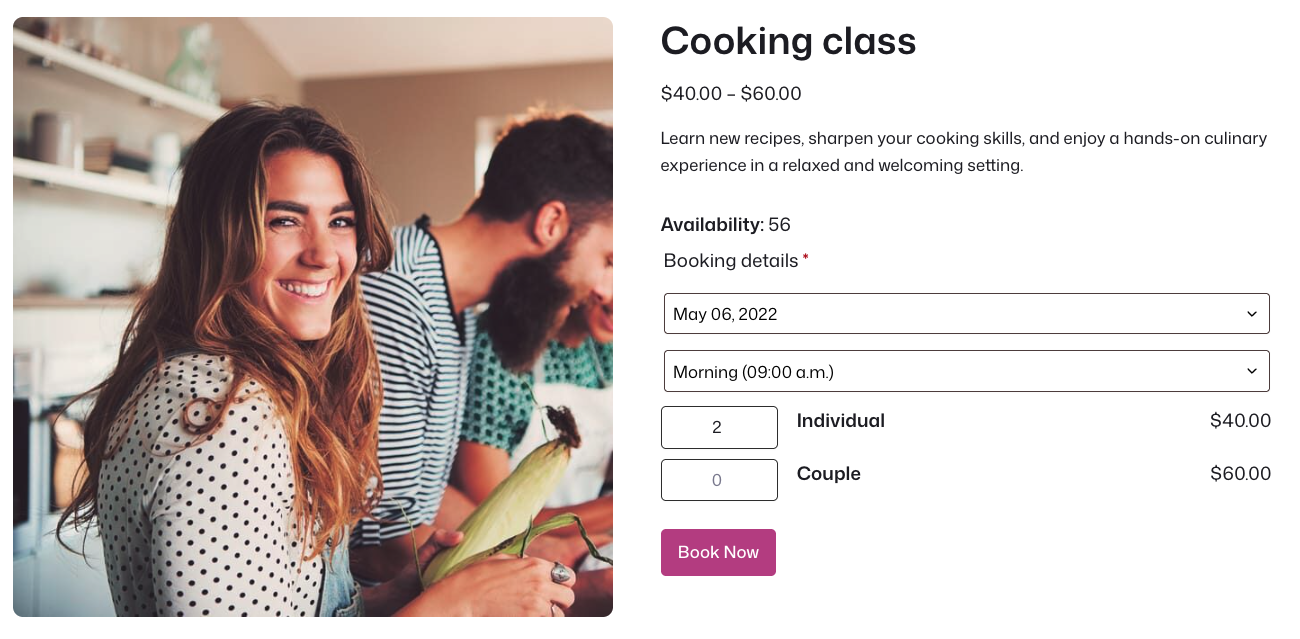
Vende clases y sesiones de entrenamiento con confianza
Vender acceso directamente a través de WooCommerce.
Gestionar capacidad para clases, fechas y franjas horarias.
Enviar confirmaciones con detalles de la clase, códigos QR y enlaces al calendario.
Rastrear asistencia utilizando la aplicación gratuita FooEvents.
Seminarios y talleres de capacitación
Venda el acceso a seminarios de capacitación únicos, talleres, cursos cortos y eventos de aprendizaje con fecha, hora, lugar, capacidad y flujo de asistentes claros.
Clases reservables y franjas horarias
Permite a los alumnos reservar fechas concretas de clases, franjas horarias, sesiones, consultas o actividades con aforo limitado mediante FooEvents Bookings.
Clases de fitness, yoga y bienestar
Venda acceso a clases únicas o recurrentes de fitness, yoga, pilates, bienestar y movimiento con fechas, capacidades y registros de asistencia separados.
Clases de cocina, arte y creatividad
Vende acceso a clases de cocina, talleres de arte, sesiones de fabricación, cursos de impresión 3D y experiencias de aprendizaje prácticas directamente desde tu sitio web.
Capacitación virtual e híbrida
Conecta FooEvents con Zoom para vender clases virtuales, talleres en línea, seminarios web, consultas y sesiones de formación híbridas.
Formatos de curso y clase
¿Cursos, clases, talleres, formación?
¡Te cubrimos!
FooEvents es lo suficientemente flexible como para ofrecer clases presenciales, sesiones virtuales, formación híbrida, cursos de varios días, franjas horarias reservables, talleres y eventos formativos periódicos.
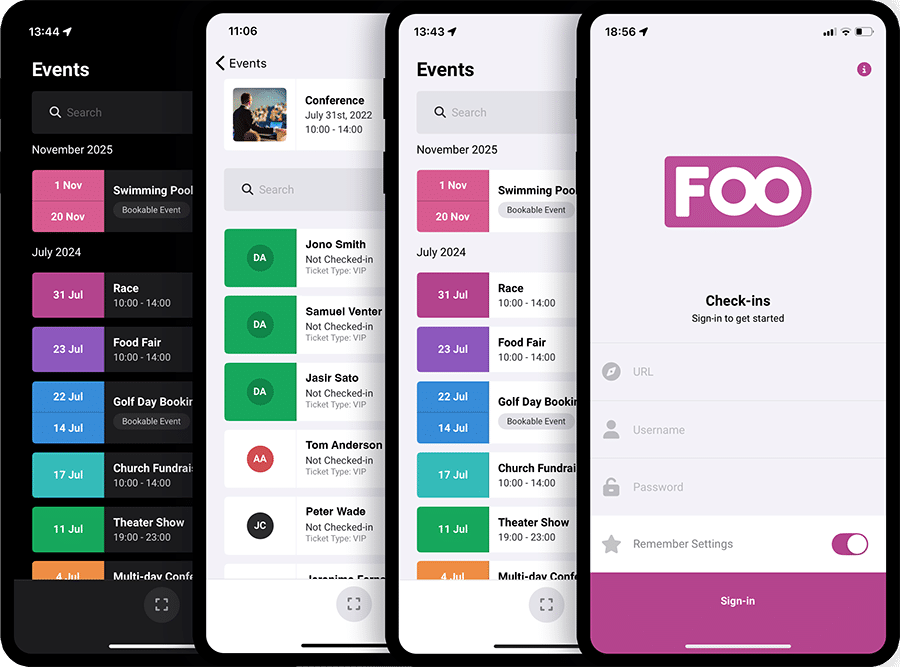
Gestionar la asistencia a clases y cursos de formación
Rastrear reservas y mantener las sesiones organizadas
Utiliza la aplicación gratuita FooEvents Check-ins para validar reservas, registrar la asistencia de los alumnos, llevar un control de la asistencia y gestionar el acceso a cursos, clases, talleres y sesiones de formación. Tanto si organizas un seminario puntual, una clase periódica, una sesión virtual o un curso de varios días, tu equipo podrá ver rápidamente quién se ha inscrito, quién ha llegado y quién aún tiene que registrarse.
A quién ayuda
Herramientas de reserva para diferentes equipos de formación
Tanto si impartes tus propias clases, organizas cursos de formación para una empresa o creas una página web de reservas para un cliente, FooEvents te ofrece herramientas prácticas que se adaptan a la forma en que ya trabajan los equipos de WordPress y WooCommerce.
Formadores, centros educativos y entidades de formación
Vende acceso a clases, gestiona la capacidad, envía confirmaciones y realiza un seguimiento de la asistencia desde tu propio sitio web sin depender de una plataforma de reservas separada.
Diseñadores, desarrolladores y agencias
Utiliza los productos, variantes, pedidos, plantillas, enlaces e integraciones habituales de WooCommerce para crear flujos de trabajo flexibles para la reserva de cursos y clases.
Gimnasios, estudios y locales para talleres
Vende acceso a clases de fitness, talleres creativos, formación profesional, consultas y sesiones recurrentes manteniendo los costos bajos.
Características del curso y de las clases
Características principales de FooEvents para cursos y clases
Explore las características amigables con el curso y la clase que le ayudan a vender acceso, gestionar la capacidad, recopilar información de los estudiantes, enviar confirmaciones, rastrear la asistencia, soportar sesiones virtuales y mantener sus datos de reserva bajo su control.
Ventas de cursos y clases
Vende acceso a cursos, clases, talleres, seminarios, sesiones de fitness y eventos de formación directamente a través de WooCommerce utilizando tu carrito de la compra, proceso de pago, pasarelas de pago, impuestos, cupones, cuentas de cliente y flujos de trabajo de pedidos actuales.
Sin comisión ni tarifas de reserva
Conserva más de tus ingresos vendiendo reservas desde tu propia página web sin pagar comisiones por reserva a una plataforma de reservas de terceros.
Múltiples tipos de registro
Crea opciones de inscripción, como «Estándar», «Estudiante», «Inscripción anticipada», «Socio», «Grupo», «Acceso en línea», «Acceso presencial», «Gratis» o «Sesión privada», utilizando las variantes de WooCommerce.
Control de capacidad de clase
Gestiona el aforo de las clases mediante los ajustes de existencias «WooCommerce», de modo que puedas controlar la disponibilidad de cada curso, clase, fecha, franja horaria o tipo de inscripción.
Captura de información del estudiante
Collect the student information your classes need, such as names, contact details, skill levels, dietary requirements, accessibility requests, age details, consent confirmations, or custom questions.
Branded confirmation emails
Send professional HTML confirmation emails that include class details, student information, QR codes, barcodes, calendar links, joining instructions, and your branding.
PDF confirmations
Using FooEvents PDF Tickets, attach downloadable PDF tickets or booking confirmations to emails so students can save, print, or present their registration when they arrive.
Add to Calendar support
Include calendar links and ICS attachments in confirmation emails so students can add class dates and reminders to their calendar apps.
Multi-day course support
Using FooEvents Varios días, manage courses, workshops, and training programs that run across multiple days, and display relevant date information on tickets, emails, reports, and student records.
Bookable dates and time slots
Let students select specific class dates, time slots, sessions, appointments, workshops, or consultations using FooEvents Reservas.
Virtual classes and Zoom access
Connect FooEvents with Zoom to register students for virtual classes, online training, webinars, consultations, and private learning sessions after purchase.
In-person, virtual, and hybrid options
Sell in-person, virtual, and hybrid access for the same course or class while keeping orders, registrations, and student data connected in WooCommerce.
Classroom seating
Use FooEvents Seating when your class, seminar, lecture, or workshop needs assigned seats, reserved areas, or controlled classroom layouts.
Mobile attendance tracking
Use the free FooEvents Check-ins apps for iOS and Android to scan QR codes or barcodes, validate registrations, search students, and manage attendance.
Offline attendance tracking
Keep marking students as attended when venue internet is unreliable, then sync attendance data once the device reconnects.
Walk-in registrations and on-site sales
Utilice FooEvents POS o FooSales to sell class access, walk-in registrations, equipment, merchandise, food, beverages, or course material on-site.
Printed confirmations and name tags
Design and print physical confirmations, labels, name tags, access passes, attendance sheets, and other class stationery using the FooEvents Stationery Builder.
Student exports
Export student and registration data to CSV for attendance planning, class lists, reporting, communication, or use with other tools.
Booking reports and insights
View bookings, revenue, registrations sold, available spaces, check-ins, check-outs, and class performance reports from inside WordPress.
Class calendar display
Use FooEvents Calendar to display courses, classes, workshops, consultations, and training sessions in a calendar or list view.
Student onboarding and automation
Connect FooEvents with tools such as Mailchimp and AutomateWoo to support student onboarding, welcome packs, class reminders, course material, follow-ups, and training updates.
Private data ownership
Keep customer, order, student, registration, and ticket data in your own WordPress and WooCommerce database instead of handing it to a hosted booking platform.
 English
  German
  Dutch
Dutch  Spanish
  Italian
  Portuguese
  French
  Polish
  Greek
Greek