Checkout Summit Case Study: Why A Woocommerce Conference Swapped Diy Ticketing For Fooevents 7
In 2026, Checkout Summit brought 101 WooCommerce professionals to Palermo, Sicily. Behind the scenes, ticketing ran on a homemade system, AI-generated name badges and a pen-and-paper check-in.
For the 2027 edition, founder Rodolfo Melogli de Business Bloomer wanted systems that could scale, so he moved ticketing to FooEvents. Within two weeks of opening sales, Checkout Summit had sold 30 tickets to attendees from 15 countries, with very little admin.
Here’s how a WooCommerce conference sells its tickets on WooCommerce, and what other organizers can learn from the setup.
At a glance
Checkout Summit 2027
Organizer
Rodolfo Melogli, Business Bloomer
Evento
The independent, in-person conference for WooCommerce professionals, now in its second year
Dates and venue
28 April–1 May 2027, Saracen Sands Hotel & Congress Centre, Palermo, Sicily
Capacity
About 150 attendees
Ticket types
Early Bird, Regular, Last Call and Microsponsor (€199–€497)
WooPayments, PayPal and bank transfer, in EUR and USD
Using FooEvents since
May 2026
A WooCommerce conference, because nobody else was running one
There hadn’t been a conference dedicated to WooCommerce professionals in years. After waiting for an official WooConf comeback, Rodolfo decided to stop waiting:
Checkout Summit Case Study: Why A Woocommerce Conference Swapped Diy Ticketing For Fooevents 8
“Right, I’ll do my own one. And maybe this will also motivate Woo to bring back WooConf.”
The first edition took 10 months of work. The Middle East crisis kept many would-be attendees away, but people still flew in from all over the world. “Seeing people flying from all over the world (when I, instead, had to drive 18 minutes…) was incredible,” Rodolfo says.
His highlight, above all the rest? “I didn’t burn out!”
Year one: DIY tickets and a pen-and-paper check-in
Rodolfo treated 2026 as an experiment and kept costs to the bare minimum. Revenue was hard to predict: some attendees cancelled at the last minute, and some sponsors pulled out after drastic rebudgeting in early 2026.
“So I built my own ticket system, had AI generate the attendees’ badges for printing, set up a… pen and paper check-in, you name it. It ‘kinda’ worked.”
With around 100 attendees, it held together, and Rodolfo doesn’t think it cost him any sales. But it wasn’t built to grow: “I had to deal with only 100 people. If I wish to scale…”
So the plan for 2027 started with the basics: “First of all, I needed… a ‘team’. Done. Second, better systems, including ticketing. Done. Third, I will need to sell out the tickets. Working on that.”
Why a developer who loves custom code chose a plugin
Going into 2027, Rodolfo wasn’t worried about ticketing. “I thought my DIY system was good enough,” he says. “Then I saw the potential of FooEvents and how I could save time and money by optimizing every step of the sale.”
Selling on his own WooCommerce site was never up for debate:
“It’s a WooCommerce conference! Obviously, it had to use WooCommerce for selling tickets :)”
The real choice was between more custom code (“I’m a coder, I like it”) and an established product. FooEvents’ track record settled it: “They’ve been around for years (forever?!) so it’s obvious they’re doing things right.” For the record, it’s been 11 years.
Rodolfo picked FooEvents for its features and integrations, and he expected good support: “The founders are lovely and you can only expect lovely things from their ‘baby’.” Setup proved him right: “If any improvement or idea came to mind, FooEvents was only an email away and was super fast at implementing my requests.”
And because FooEvents runs inside WooCommerce, Checkout Summit pays FooEvents no commission or per-ticket fees, and every order and attendee record stays on its own site.
How Checkout Summit’s ticketing is set up
Rodolfo’s verdict on setup: “Super smooth, FooEvents doesn’t have many settings and it’s quite straightforward.” Here’s what he built.
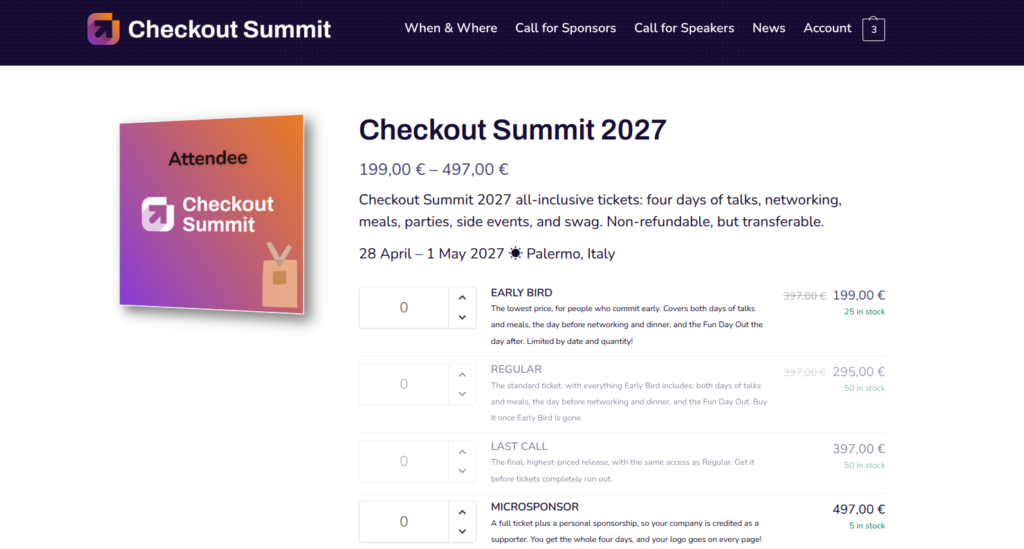
Four ticket types in one product
All tickets live in a single WooCommerce variable product, with one variation per ticket type and a fixed stock limit for each:
Ticket type
Precio
Stock limit
Madrugadores
€199
50
Regular
€295
50
Last Call
€397
50
Microsponsor (full ticket plus a personal sponsorship)
€497
10
The FooEvents Table Variation Layout shows every option on one page, each with its own quantity selector and remaining stock. The cheaper tiers show the €397 Last Call price crossed out, and Regular and Last Call stay greyed out while Early Bird is on sale, so buyers can see exactly what waiting will cost them.
All Four Ticket Types On One Page, Each With Its Own Stock Count.
Only the attendee details that matter
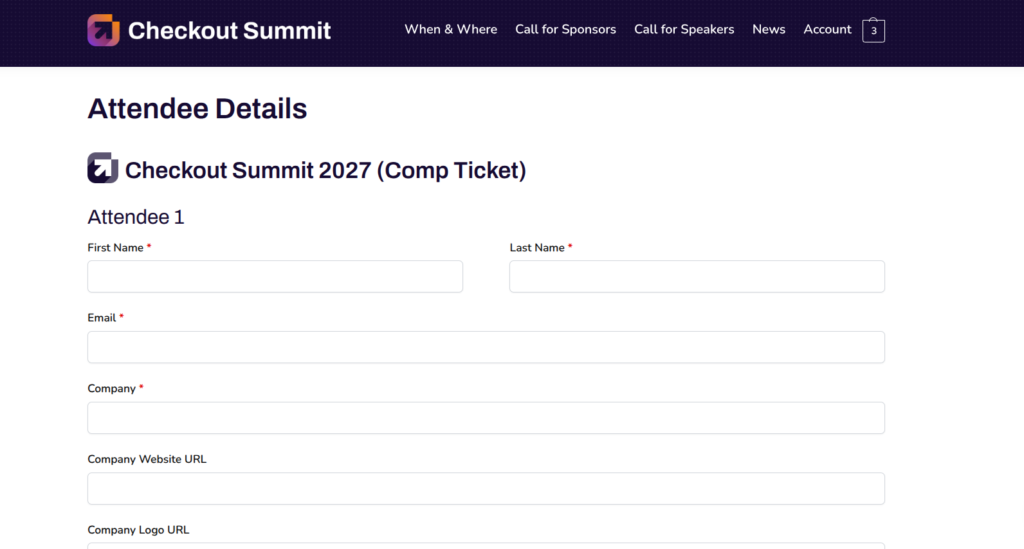
FooEvents Campos de asistente personalizados collects each attendee’s name, email, company, company website, company logo, social media profile, dietary restrictions and media consent. “I tried to reduce these fields to the bare minimum so as not to kill the conversion rate,” Rodolfo says.
Attendee Details Are Collected For Every Ticket, Comp Tickets Included.
What attendees receive
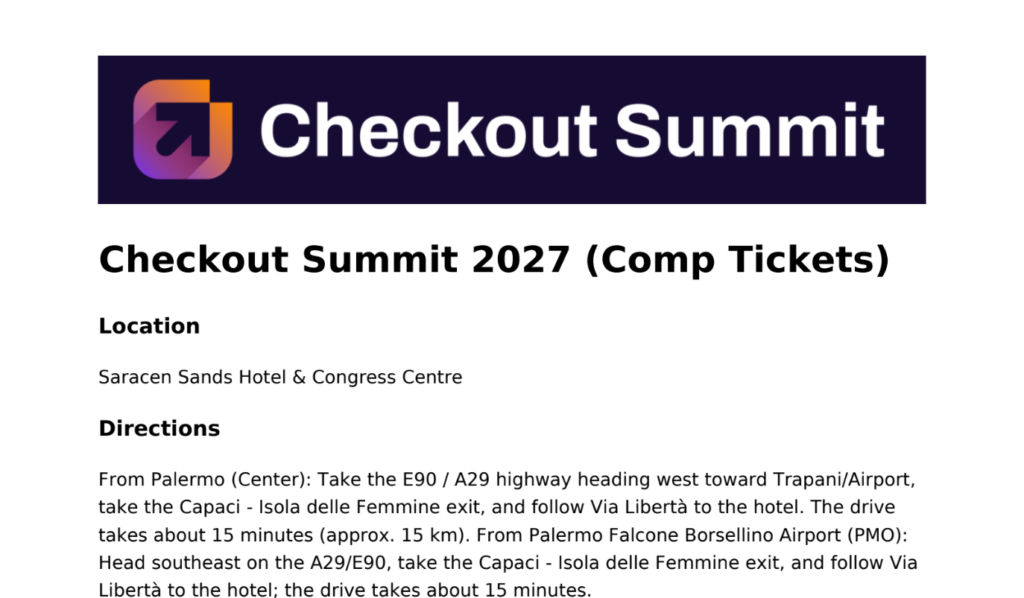
Each order comes with a receipt, an invoice and a PDF ticket from FooEvents Entradas PDF, branded with the Checkout Summit logo. The ticket email also carries the venue details and directions. Rodolfo plans to add more information to the PDF, though it isn’t meant for printing.
The Ticket Email Gives Attendees The Venue And Directions.
Comp tickets and hotel bookings
Complimentary tickets for speakers, sponsors and volunteers live in a separate product that’s hidden from the public. Comp holders get a direct link, redeem their ticket there and fill in the same attendee details as everyone else.
Hotel rooms are booked directly with the venue, so a simple form after checkout forwards each attendee’s booking request to the hotel by email.
Rodolfo’s favourite snippet
Microsponsors get their logo on every page of checkoutsummit.com, and nobody updates that list by hand. Rodolfo’s snippet loops through the attendees and, if they entered a logo URL, prints the logos in a grid. In his words: “Fun!”
The rest of the stack
Alongside FooEvents, the site runs PDF Invoices & Packing Slips, Fluent Forms, FluentSMTP, Code Snippets Pro, Independent Analytics, Slim SEO, Simple CAPTCHA with Cloudflare Turnstile and Albert – The AI Butler.
The launch: waitlist first, then everyone
Rodolfo built a waitlist ahead of launch and gave it first access to Early Bird tickets on the weekend of 26–27 September. Then sales opened to the public.
“We did 25 early birds and 5 microsponsors in the first week :)”
Result (as of 8 October 2026)
Number
Orders on the waitlist-only weekend
16
Waitlist sign-ups who bought a ticket
18 of 50 (36%)
Tickets sold
30
Countries represented
15
Attendees so far come from Bangladesh, Belgium, Canada, the Czech Republic, Germany, Ireland, Italy, Liechtenstein, Lithuania, the Netherlands, Portugal, Romania, Switzerland, South Africa, the UK and the USA. Email drives the most sales, followed by social media.
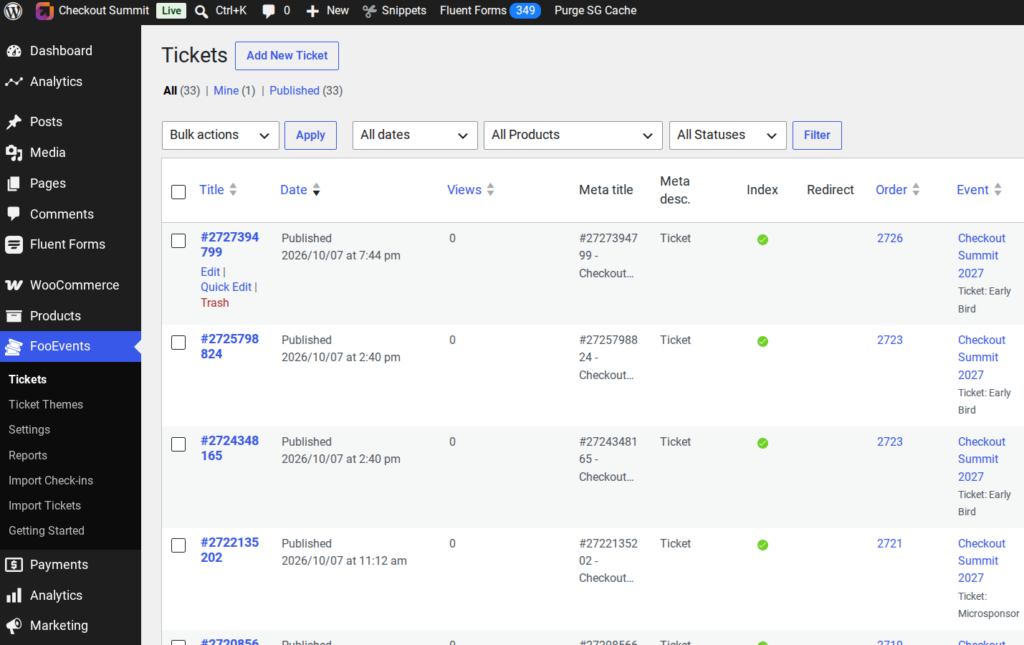
The admin load has shrunk, too. Asked how much time ticketing takes each week compared with 2026, Rodolfo replied: “VERY LITTLE! Yes, in all caps.” Ticket-related support emails have been rare so far, and he’s added a chatbot to help with routine questions.
Every Ticket Appears In Fooevents, Linked To Its Order And Ticket Type.
The biggest surprise? “Most people from last year are going to be back.” And the biggest difference FooEvents made, in Rodolfo’s own words:
“I have a system that works, and a team that can support me.”
Rodolfo’s advice: “Use a plugin!”
Asked for his top tips on selling conference tickets with WooCommerce, the developer who likes writing his own code kept it short:
“Use a plugin!”
His advice for organizers weighing up FooEvents is just as direct: “I know the team behind it, and they’re good.”
Five ideas from Checkout Summit’s setup that any organizer can borrow:
Give your waitlist first access. A launch weekend just for the waitlist rewards your keenest buyers and starts sales with momentum. Email was Checkout Summit’s top channel, and our early-bird email templates can help you plan yours.
Build price tiers as variations with fixed stock. Stock limits enforce your capacity and create urgency, and a WooCommerce sale price on the cheaper tiers shows the full price crossed out, so the saving is obvious. Here’s how to create tiered ticket pricing in FooEvents.
Ask only for the attendee details you’ll use. Each extra field adds friction at checkout.
Keep comp tickets in a hidden product. Speakers, sponsors and volunteers redeem them through the same flow, with no public price.
Make attendee data work twice. Checkout Summit’s company logo field also powers its microsponsor wall.
What’s next: “Conquering the (Woo) world”
Checkout Summit 2027 runs from 28 April to 1 May in Palermo, and tickets are on sale now at checkoutsummit.com. The goal for this year is a sell-out. After that? “Conquering the (Woo) world.”
We’ll catch up with Rodolfo after the summit for Part 2 of this case-study, including how the check-in process went and the final numbers.
FooEvents is the technology partner for Checkout Summit 2027.
Running your own conference? FooEvents turns your WooCommerce site into a complete ticketing platform. Sell tickets, collect attendee details and check people in from your own website, with no commission or per-ticket fees. Learn more about FooEvents
Colin is an entrepreneur based in Canada and the co-founder of FooEvents, a leading event, ticketing, and bookings platform built for WooCommerce. Since co-founding the digital agency Grenade in 2012, where FooEvents was born, he has helped businesses around the world sell tickets, manage bookings, check in attendees, and run successful events from their own WordPress websites.
Ready to start selling tickets?
Convierte tu página web de WooCommerce en una plataforma completa de venta de entradas para eventos con FooEvents. Vende entradas directamente desde tu página web, gestiona las reservas y los asistentes, envía entradas con tu marca y realiza el registro de los asistentes con todo lo que necesitas para organizar eventos con éxito.




 English
  German
  Dutch
Dutch  Spanish
  Italian
  Portuguese
  French
  Polish
  Greek
Greek