
Core Plugin
FooEvents for WooCommerce
Sell tickets and manage free registration for practically any type of physical or virtual event such as a concert, class, conference, tour, webinar, fundraiser or sports fixture. FooEvents doesn’t require any tech skills and you can be up and running within minutes.
“We are a medium-sized event agency in Germany and use this system for all of our events (100-7000 people).”
— Henning Klus
“FooEvents has sold over 100,000 tickets for me. Support is awesome, the flexibility of the plugin is great and it’s transformed my business.”
— Fiona Dawson
“I’ve used FooEvents for a number of clients now. They are all delighted, and the flexibility is unparalleled.”
— Scott Spence
Sell tickets directly from your WooCommerce store
FooEvents turns WooCommerce products into events. Sell tickets, manage attendees, accept payments, and control the entire event experience from your own WordPress website.

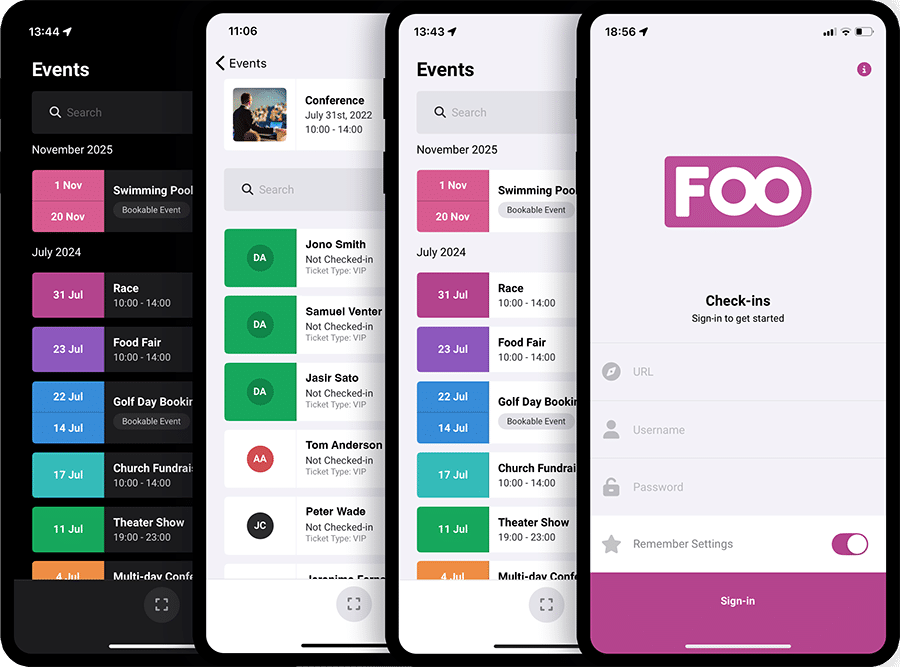
Free Check-ins App
Manage access with our free mobile Check-ins apps
The FooEvents Check-ins apps for iOS and Android are free to download and use with the FooEvents for WooCommerce plugin. Validate tickets, track attendance, and keep your entrance moving with a professional mobile check-in experience that connects directly to your FooEvents-powered event data.
Sell Tickets
Custom tickets that fit your event
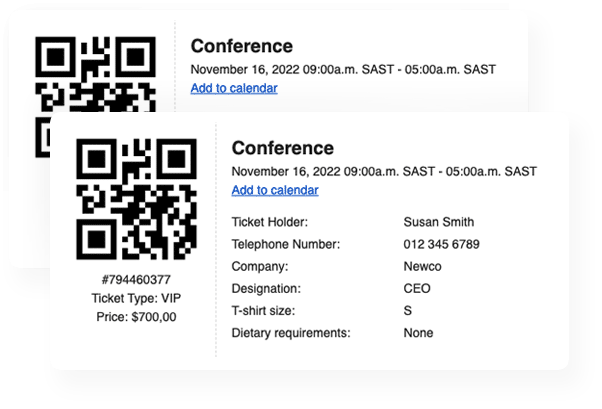
Customize every part of the ticket experience, from branding and layout to delivery and format. Choose from over 20 free Ticket Themes or create your own to match your event.
Insights
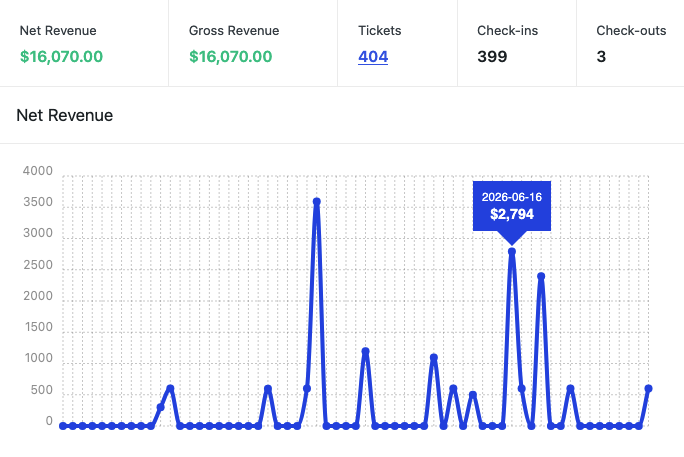
Make informed decisions with real-time event reports
Get real-time insights into ticket sales and event performance, seamlessly integrated with your WooCommerce sales reports.
14-Day Money Back Guarantee
Turn WooCommerce into an event ticketing platform
FooEvents for WooCommerce lets you sell event tickets directly from your WordPress website, manage attendees, send branded ticket emails, and check people in using QR codes. Keep full control of your payments, customer data, branding, and ticket sales.
Sell tickets with WooCommerce
Turn WooCommerce products into ticketed events and sell tickets using your existing WooCommerce checkout, payment gateways, taxes, coupons, customer accounts, and order workflows.
Create ticket types using variations
Use WooCommerce variable products to create ticket types such as General Admission, VIP, Early Bird, Student, Member, or other pricing options.
Ticket inventory management
Control ticket availability using WooCommerce stock management to help reduce the risk of overselling.
No commission or ticket fees
Sell event tickets directly from your own website without paying per-ticket commissions to a third-party ticketing platform.
100+ WooCommerce payment gateways
Accept ticket payments using any WooCommerce compatible payment gateway.
Built-in variation table display mode
Display ticket types in a table layout with quantity fields, making it easier for customers to compare and select ticket options.
Automatic ticket generation
Automatically generate tickets when customers purchase event products, keeping ticket records connected to the relevant WooCommerce order.
Branded HTML ticket emails
Send professional HTML tickets by email using customizable ticket themes, logos, header images, brand colors, and ticket content.
Free Ticket Theme support
Use FooEvents Ticket Themes to style tickets, preview designs, and send branded tickets that match your event or organization.
Configurable ticket emails
Customize ticket email subject lines, body copy, recipients, ticket delivery behavior, and whether tickets are sent to the purchaser or attendee.
QR code and barcode tickets
Add QR codes or barcodes to tickets so they can be scanned and validated during check-in.
Free mobile Check-ins apps
Use the free FooEvents Check-ins apps for iOS and Android to scan tickets, search attendees, validate ticket status, and manage event access.
WooCommerce coupon support
Use WooCommerce coupons and discounts for ticket sales and event promotions.
WooCommerce tax support
Apply WooCommerce tax settings to ticket sales where required.
Duplicate check-in prevention
Help prevent the same ticket from being used more than once by tracking each ticket’s current check-in status.
Attendee detail capture
Collect attendee information during checkout or using the dedicated Attendee Details page.
Admin ticket management
View, filter, edit, resend, cancel, and manage tickets from the WordPress dashboard.
Manual ticket creation
Create tickets from the admin area for offline orders, complimentary access, support cases, or manual registrations.
Free event registration
Create free events and issue tickets or registrations without charging attendees.
CSV ticket import
Import tickets in batches from CSV files, which is useful for migrations, offline sales, or externally managed attendee lists.
Attendee CSV export
Export attendee data for an event, with options to include unpaid tickets and billing details.
My Account ticket access
Display purchased tickets in the customer’s WooCommerce account and order area, making it easier for attendees to find their tickets after purchase.
Thank-you page ticket display
Show generated tickets and event details on the WooCommerce thank-you page after checkout.
Event reports and insights
View ticket sales, revenue, tickets sold, available tickets, check-ins, check-outs, and event performance reports inside WordPress.
Check-in and check-out reporting
Track attendee check-ins, check-outs, timestamps, and check-in activity from the event reports.
Event and ticket expiration
Automatically expire events or tickets using fixed dates or elapsed time rules.
Event Listing block
Display upcoming events using the FooEvents Event Listing block, including event details, pricing, availability, and ticket purchase buttons where relevant.
Attendee Listing block
Display attendee lists on the front-end using the FooEvents Attendee Listing block.
Event product listing enhancements
Show event dates on WooCommerce product listings and add event-specific sorting options to improve event browsing.
Add to Calendar support
Include calendar links and ICS attachments in ticket emails so attendees can add events to their calendar apps.
Calendar reminder alerts
Add reminder alerts to calendar files so attendees can receive calendar notifications before the event.
Zoom meetings and webinars
Link events to Zoom meetings or webinars, auto-generate meetings, and register attendees when they purchase tickets.
Mailchimp integration
Add attendees to Mailchimp audiences and apply tags when attendee details are captured.
AutomateWoo support
Use FooEvents ticket and attendee variables in AutomateWoo workflows for event-related automation.
AddToWallet integration
Support wallet-style ticket passes through AddToWallet when configured with an AddToWallet account and API key.
Stationery Builder
Design and print name tags, badges, wristbands, labels, and physical tickets using a drag-and-drop layout builder.
Custom event terminology
Rename labels such as “Event,” “Attendee,” and “Book ticket” to match your use case, audience, or brand language.
WooCommerce Analytics compatibility
Use WooCommerce Analytics and reporting tools to review ticket sales, revenue, and order performance.
WooCommerce HPOS compatibility
Works with WooCommerce High-Performance Order Storage for modern WooCommerce order architecture.
WordPress theme compatibility
Display event products using your existing WordPress theme and WooCommerce product templates.
WordPress Multisite support
Run FooEvents in WordPress multisite environments where multiple sites need their own event ticketing setup.
Private data ownership
Customer, order, attendee, and ticket data stays in your WordPress and WooCommerce database instead of being hosted by a third-party ticketing platform.
WooCommerce Checkout Blocks compatibility
FooEvents supports WooCommerce Checkout Block workflows using the Attendee Details page, allowing stores to collect attendee information before customers complete checkout.
License Details
Everything You Need to Succeed
Every FooEvents license gives you access to high-quality tools backed by reliable updates, dedicated support, and clear help resources to help ensure everything runs smoothly from day one.
Purchase Individually
You can also purchase this extension on its own, but we recommend purchasing a bundle for the best value.
Included in your Purchase
- Downloadable plugin files
- 12 Months premium support
- 12 Months plugin updates
- Free iOS & Android check-in apps
- User-friendly documentation
A license entitles you to 12 months of updates and support from the date of purchase. It can be used by you or a client and cannot be resold or redistributed in its original or modified state. All purchase options are billed annually but you can cancel your subscription at any time. If you’re unhappy with your purchase, we offer a 14 Day Money-Back Guarantee.
 English
  German
  Dutch
Dutch  Spanish
  Italian
  Portuguese
  French
  Polish
  Greek
Greek