
Extension
FooEvents Seating
FooEvents Seating is an extension for the FooEvents for WooCommerce plugin that adds reserved seat selection to your events. It lets you create seating groups such as rows, tables, or areas, control which seats are available, link seats to WooCommerce product variations for different pricing options, and display each attendee’s selected seat details on their ticket.
Sell reserved seating tickets with WooCommerce and FooEvents
Sell reserved seats for venues and shows.
Create seating groups such as rows or tables.
Control seat availability for individual seats.
Show seat details on attendee tickets.
14-Day Money Back Guarantee
Seating built for real-world events
Explore the key features that make FooEvents Seating useful for reserved seating events, from creating seating groups and managing availability to offering different pricing options and displaying seat details on attendee tickets.
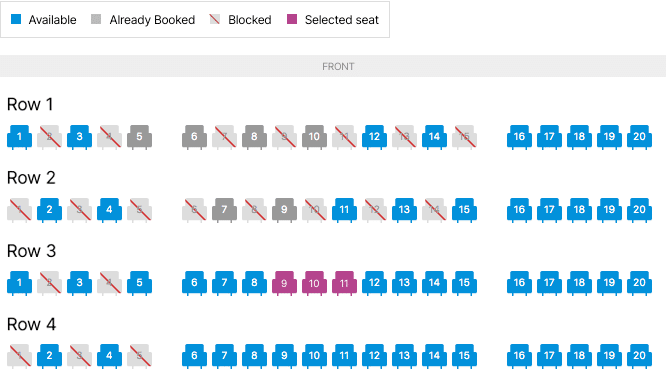
Interactive seating charts
Create seating charts that let attendees select their seats when purchasing tickets. This gives customers a clear, visual booking experience and helps them choose the seats that work best for them.
Assigned seat selection
Allow customers to reserve specific seats during checkout, making FooEvents Seating ideal for theatres, shows, conferences, talks, workshops, and other events where assigned seating is required.
Row and seat management
Set up seating areas using rows and seats, then assign seat labels, quantities, and layout details based on your venue or event setup. This makes it easy to organize reserved seating in a structured way.
Automatic seat reservation
Once a seat is selected and purchased, FooEvents links that seat to the customer’s ticket and order. This helps prevent the same seat from being sold more than once.
Seat details on tickets
Display seat information on ticket emails and attendee records, so customers know exactly where they are sitting and event staff can quickly confirm seating details when needed.
Variation-Aware Seating Layouts
Support seating setups that work with product variations, while optionally showing the full venue layout for better context.
Product Page Seat Selection
Display seating options directly on the event/product page and require customers to choose seats before checkout.
Checkout Seating Chart Support
Show a seating chart link during checkout so customers can review their selected seating layout before completing their order.
Manual Seat Availability
Choose exactly which seats attendees can book by manually marking individual seats as available or unavailable.
License Details
Everything You Need to Succeed
Every FooEvents license gives you access to high-quality tools backed by reliable updates, dedicated support, and clear help resources to help ensure everything runs smoothly from day one.
Purchase Individually
You can also purchase this extension on its own, but it requires the main FooEvents for WooCommerce plugin to be installed and activated.
Included in your Purchase
- Downloadable plugin files
- 12 Months premium support
- 12 Months plugin updates
- Free iOS & Android check-in apps
- User-friendly documentation
A license entitles you to 12 months of updates and support from the date of purchase. It can be used by you or a client and cannot be resold or redistributed in its original or modified state. All purchase options are billed annually but you can cancel your subscription at any time. If you’re unhappy with your purchase, we offer a 14 Day Money-Back Guarantee.
 English
  German
  Dutch
Dutch  Spanish
  Italian
  Portuguese
  French
  Polish
  Greek
Greek