
Tickets
Send and manage tickets directly from your WordPress website
Take complete control over what your tickets look like, how they are sent, the format they are sent in, and how they are used by you, your team and your customers.
Create tickets that look the part
FooEvents helps you create professional digital tickets that include the key event, attendee, order, and check-in details your customers and team need.
Send tickets automatically
Tickets are generated after purchase and sent by email, giving attendees a convenient ticket they can access from their inbox and use as proof of entry.
Match tickets to your brand
Customize ticket designs with your logo, colors, header images, event details, and ticket content so every ticket feels polished and on-brand.
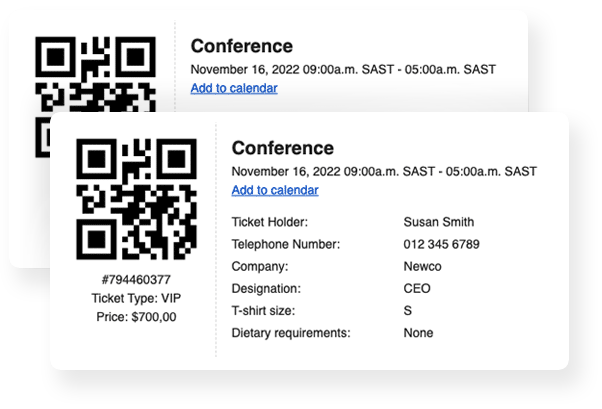
Create professional tickets for every attendee
FooEvents automatically generates tickets when customers purchase event products through WooCommerce. Each ticket can include important event, order, attendee, and check-in details, along with QR codes or barcodes for validation at the door. Tickets are sent by email, can be branded using Ticket Themes.
Features
Powerful Ticketing Features
Discover how FooEvents handles ticket generation, ticket delivery, ticket details, ticket themes, and flexible ticket options.
Multiple ticket types
Create different ticket types with their own pricing, stock, and access options. This is useful for events with general admission, VIP, student, early bird, or other ticket categories.
Ticket stock management
FooEvents uses WooCommerce stock and order management to control ticket availability and help prevent overselling.
Ticket expiry
Set tickets to expire on a fixed date or after a specific amount of time has passed since purchase.
QR codes and barcodes
Each ticket can include a unique QR code or 1D barcode, which can be scanned at the event to manage access.
Ticket scanning
Scan ticket QR codes or barcodes using the free FooEvents Check-ins apps, a compatible Bluetooth barcode scanner, or FooEvents Express Check-in on a computer.
Branded ticket emails
Send branded ticket confirmation emails that include your event logo, attendee details, event information, and a unique QR code or barcode.
Ticket themes
Choose from over a dozen free Ticket Themes to change the appearance of your tickets and match your event branding.
Custom ticket templates
Customize an existing Ticket Theme or use the Canvas Theme to create your own ticket layout with basic HTML knowledge.
PDF tickets
Use the FooEvents PDF Tickets extension to attach tickets as PDF files to ticket emails, making them easy to save, download, and print.
Apple Wallet and Google Wallet support
FooEvents integrates with AddToWallet, allowing attendees to add tickets to Apple Wallet or Google Wallet on their mobile phones for quicker access at the venue.
Downloadable tickets
Use the FooEvents PDF Tickets extension to allow attendees to download PDF tickets from the My Account section of your website, which is useful if a ticket email is lost or needs to be reprinted.
Add to calendar
Add an “Add to calendar” button to tickets so attendees can download an ICS file and add the event to their preferred calendar app.
Print-friendly tickets
PDF tickets generated using the FooEvents PDF Tickets extension are designed to be easy to download and print from any device that supports PDF files.
Manual ticket creation
Create tickets manually from the WordPress admin area for existing customers or new users.
Resend tickets
Resend tickets individually or in bulk to purchasers or attendees from the WordPress admin area.
Frequently Asked Questions
Frequently asked questions
Learn how FooEvents creates, sends, customizes, and manages tickets for different types of events.
Can I create different ticket types?
Yes, you can create different ticket types that have their own stock count, price, discount etc. This is ideal for events where access is based on the type of ticket that your customer purchased.
How does FooEvents manage ticket availability?
FooEvents leverages powerful order and stock management functionality that is native to WooCommerce so that you can specify the number of tickets available to prevent overselling.
Can I automatically expire tickets?
Yes, you can set your tickets to expire on a fixed date or after a specific amount of time has elapsed since the ticket was purchased.
Do tickets contain a QR code or barcode?
Yes, all tickets include either a unique 1D barcode or QR code by default which can easily be disabled through a setting.
How do you scan the QR code or barcode?
You can scan the ticket barcode using the FREE FooEvents Check-ins app which can also be paired with a Bluetooth barcode scanner or from a computer with the FooEvents Express Check-in extension.
Can I brand the tickets or booking confirmation emails?
Yes, you can send custom branded ticket emails to attendees or ticket purchasers. Tickets include the event logo, attendee and event details and a unique 1D barcode or QR code.
Do you have any ticket templates that I can use?
There are over 20 FREE professionally designed Ticket Themes that you can use to transform the appearance of your tickets and make your event stand out.
Can I use my own email templates?
Yes, with very little HTML knowledge you can customize the layout and design of any current Ticket Theme or use the Starter Theme as a template to design your own tickets from scratch.
Can I send PDF tickets?
Yes, using the FooEvents PDF Tickets extension you can attach tickets as PDFs to the emails that are sent to attendees or ticket purchasers so that they can be saved and printed out in a standard format.
Does FooEvents support adding tickets to Apple Wallet or Google Wallet on mobile phones?
Yes, FooEvents integrates with AddToWallet, allowing attendees to store their tickets directly in Apple Wallet or Google Wallet on their mobile phones. Tickets are still delivered as usual, but attendees will also have the option to add them as mobile passes. This makes it quicker and more convenient to access tickets, especially when arriving at the venue.
How can attendees download tickets?
Attendees can login and download their PDF tickets directly from the ‘My Accounts’ section of your website. This is a convenient solution for replacing lost or damaged tickets.
Can attendees add events to their calendars?
You can include an ‘Add to calendar’ button on your event tickets which gives ticket purchasers the option of downloading an ICS file which adds the event to their preferred calendar.
Are tickets print-friendly?
PDF Tickets are very print-friendly and attendees can download and print their tickets out from any device that supports PDFs.
Can I manually create tickets in the WordPress Admin Area?
Yes, you can manually create tickets for existing customers on your website or create a new user on-the-fly from your WordPress Admin Area.
Can I resend tickets?
Yes, tickets can be resent individually or to a bulk group of purchasers or attendees at any time from your WordPress Admin Area.
 English
  German
  Dutch
Dutch  Spanish
  Italian
  Portuguese
  French
  Polish
  Greek
Greek