
Events
Turn your events into products that sell
Your events and services are digital products. This is the basic premise behind FooEvents and it’s what makes it possible to leverage WordPress and the WooCommerce ecosystem to create powerful event and ticketing websites in record time. No coding, no ticket fees, no commission!
Sell tickets from your own website
FooEvents lets you sell event tickets directly from your WordPress website, giving you full control over your checkout, customer data, payments, branding, and ticket revenue.
Create events for different formats
Run simple one-day events or build more advanced setups for conferences, classes, shows, sports fixtures, fundraisers, virtual events, and more.
No commission or ticket fees
Payments are processed through your chosen WooCommerce payment gateway, so there are no per-ticket commission fees from FooEvents.
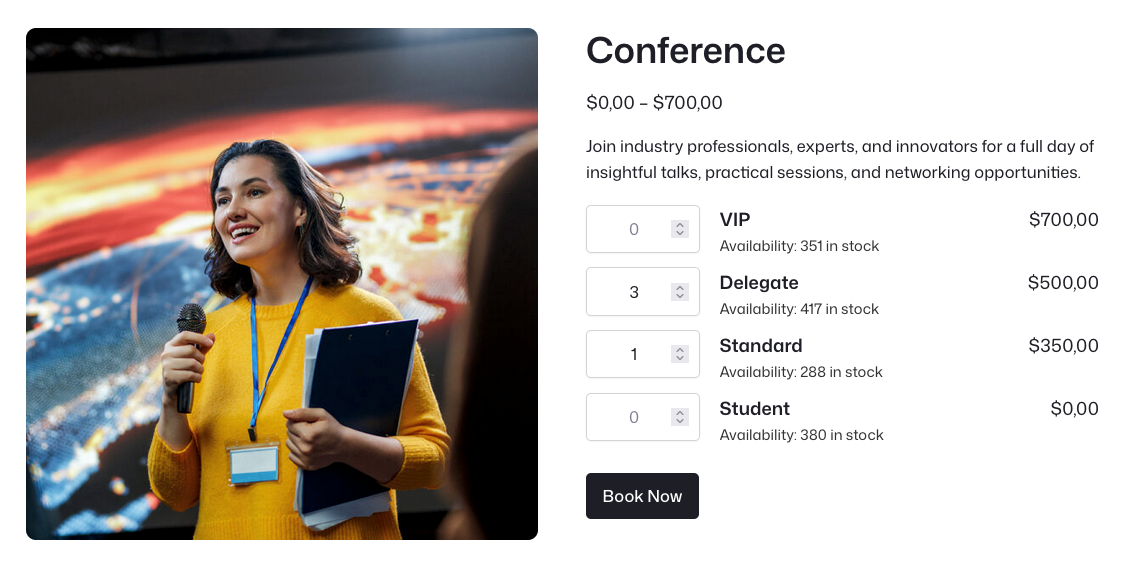
Run events directly from WooCommerce
FooEvents works differently from traditional event platforms by turning WooCommerce products into fully functional events. This means you can use the power and flexibility of WooCommerce to sell tickets, take bookings, manage attendees, accept payments, send tickets, and control the entire event experience from your own WordPress website.
Features
Everything You Need
to Manage Events
1Explore the tools that help you create, configure, display, and manage events directly from your WooCommerce store.
Unlimited events and tickets
Create an unlimited number of events and sell unlimited tickets with any FooEvents license. Licenses are based on the number of websites where FooEvents is installed, not the number of events or tickets sold.
Sell tickets, products, and digital goods together
Use WooCommerce to sell event tickets, physical products, digital downloads, and other products from the same online store.
Support for free events
Sell tickets or register attendees for free events. Attendees will be issued tickets and registered on your system which is great for building a database and post event analysis.
Works with WooCommerce themes
FooEvents uses WooCommerce product templates, so your event pages work with most WooCommerce-compatible themes and can be customized to match your website.
Custom event pages
Each event has its own product page with a unique URL. Depending on your setup, event pages can include descriptions, images, event information, maps, ticket options, variations, and related products.
Custom event terminology
Replace default FooEvents wording with terms that match your event or industry. For example, change “attendees” to “participants,” “students,” “guests,” or “customers.”
Multilingual support
FooEvents includes language files for Afrikaans, Catalan, Czech, German, Spanish, French, Italian, Dutch, and Portuguese.
Custom translations
Modify the included translations or create your own custom language files to match your site’s language requirements.
Translation plugin compatibility
FooEvents is compatible with popular multilingual WordPress plugins including TranslatePress and WPML.
Runs on your own website
FooEvents runs on your own WordPress and WooCommerce website. Your event, customer, order, ticket, and attendee data stays in your own database.
Automatic event expiry
Set events to expire on a specific date. You can disable ticket sales or hide the event from your website once it has expired.
WordPress Multisite support
Use FooEvents on WordPress Multisite networks, allowing multiple sites or clients to create and manage their own events.
Event calendars
Display events in a calendar format using the FooEvents Calendar extension. Calendars can be added to posts and pages using shortcodes or widgets.
Bookable dates and time slots
Use FooEvents Bookings to sell bookable events, venues, classes, appointments, tours, and services. Customers can view availability and book a date or time slot online.
Multi-day events and daily check-ins
Use FooEvents Multi-day to sell tickets for events that run over multiple calendar or sequential days, with separate check-ins for each day.
Seating charts
Use FooEvents Seating to create visual seating charts where attendees can view available seats and select their own seats during the purchase process.
Demo events
Explore the FooEvents demos to see how different event types, booking setups, seating layouts, ticket options, and check-in workflows can be configured.
Labels, badges, and wristbands
Print custom name tags, wristbands, tickets, badges, and personalized labels using a drag-and-drop layout interface.
Frequently Asked Questions
Got questions about
using FooEvents for events?
Find answers to common questions about creating events, choosing event types, and managing event settings in FooEvents.
Do I pay commission or ticket fees?
Nope! Tickets and bookings are sold directly from your own website and payments are processed via any payment gateway that WooCommerce supports. Whether you sell 10 or 10,000 tickets, all your revenue belongs to you!
How many tickets can I sell?
All FooEvents licenses allow you to create an unlimited number of events and tickets at no additional cost! Licenses are only limited to the number of websites on which FooEvents can be installed.
Can I also sell physical products?
Yes, you can sell tickets, physical goods and digital products all from the same website using the powerful combination of FooEvents and WooCommerce.
Can I use FooEvents for free events?
Absolutely. Attendees will be issued tickets and registered in your WooCommerce database which is great for building a CRM database and managing event access.
Can I change the design and layout?
FooEvents works seamlessly with the majority of WooCommerce compatible themes, meaning you have countless options to choose from when jazzing up your store and marketing your events to customers. The event page uses WooCommerce templates which makes it easy to customize and make your own.
Can I translate FooEvents to a different language?
Yes, you can modify the translations that are bundled with the FooEvents plugins or you can create your own custom language files.
Is FooEvents compatible with translation plugins?
FooEvents is compatible with TranslatePress and WPML, popular WordPress multilingual plugins that let you translate your website content into multiple languages.
What information is displayed on the event page?
Each event page has a unique URL that includes the event description, summary, image gallery, Google Map, event information, variation drop-downs and related products.
Can I use different terms for my event and attendees?
Yes, you can override the use of the FooEvents default terminology with your own wording so that it’s customized for your event. For example, you could change ‘Attendees’ to ‘Participants’, ‘Students’ or ‘Customers’.
Are there any external dependencies?
Nope. FooEvents is designed to run on your own WooCommerce website and is not dependent on any third-party plugins, external services or databases. Simply install the FooEvents plugin, configure and start selling.
Can I automatically expire events?
Yes, you can set your events to expire on a specified date and can either choose to disable sales for the event or hide the event from your website on the specified date.
Does it work with WP Multisite?
FooEvents supports WordPress Multisite which gives your clients the ability to create and manage their own events and sell tickets in a WordPress Multisite “network”.
Can I display events in a calendar?
Yes, you can add calendars for your events to your website. Calendars support various themes and can be added to your posts and pages using simple shortcodes or widgets.
Can I make events bookable by time and date?
Yes, with the FooEvents Bookings extension, you can sell access to bookable events, venues, classes and services. Let your customers check availability on your website and book a slot. No phone calls or emails, 100% self-service.
My event runs over multiple days, can I do multiple check-ins for each attendee?
Yes, with the FooEvents Multi-day extension, you can sell multi-day tickets that give your attendees access to an event over multiple calendar or sequential days, with separate check-ins for each day.
Does FooEvents support seating charts?
Yes, you can create and manage visual seating charts where attendees can view which seats are booked and select their own seats from the ones that are available using the FooEvents Seating extension.
 English
  German
  Dutch
Dutch  Spanish
  Italian
  Portuguese
  French
  Polish
  Greek
Greek