


This release introduces the new Attendee Details Page, ticket theme updates, ticket theme version notices, PDF ticket folder protection, and an updated DOMPDF library.
FooEvents for WooCommerce version 2.0.0 is an important release that addresses several long-standing challenges and lays a stronger foundation for the future of the platform. It introduces meaningful improvements across key areas and helps set a clear direction for how FooEvents will continue to evolve over time.
Introducing the Attendee Details Page
The biggest change in this update is the new Attendee Details Page. Instead of collecting attendee information during checkout, FooEvents can now redirect customers to a dedicated, customizable page before checkout where customers complete the required attendee details for each ticket and then continue to payment.
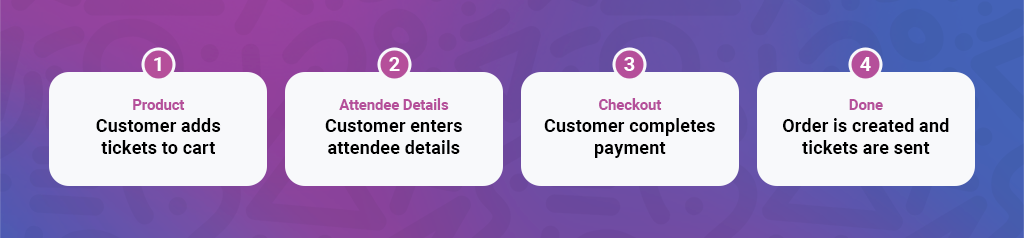
This new workflow adds full support for both the classic WooCommerce checkout experience and the WooCommerce Checkout Block, giving FooEvents a more consistent and reliable foundation across both checkout types.
In addition, by moving attendee details into a dedicated flow, it creates a cleaner path to payment and makes the overall purchase journey easier to follow and more in line with industry standards.
The Attendee Details Page is a standard WordPress page, so it’s easy to customize and make your own using the block editor or your favorite page editor. The attendee fields inherit WooCommerce form styling, so they will match the rest of your checkout forms without any customization needed.
The Attendee Details Page is in Beta and is not currently enabled by default. It can be enabled in the FooEvents > Settings > Attendees section. Read this guide for further details.
Built for Classic Checkout and the Checkout Block
Supporting both the legacy shortcode-based WooCommerce checkout flow and the newer block-based checkout introduced various challenges and significant technical overhead. After exploring many options, we settled on the new Attendee Details Page as it gives FooEvents a single attendee collection workflow that works across both checkout experiences. That means fewer edge cases, fewer compromises, efficient code, and a clearer path forward as WooCommerce continues to develop its checkout architecture.
Previously, FooEvents extensions only offered limited support for the WooCommerce Checkout Block. With the new attendee workflow, FooEvents works consistently with all FooEvents extensions, including:
Depending on your event setup, this means you can still capture the booking, seating, and attendee data you need, but in a workflow that is cleaner and more consistent than before.
Looking Ahead
The new attendee workflow is currently opt-in, so nothing changes on your site unless you choose to enable it. Over time, this will become the default experience on new installations.
Ticket Theme Updates Are Now Easier to Manage
This release also introduces a new ticket theme update option that can be used to upload new versions of ticket themes.
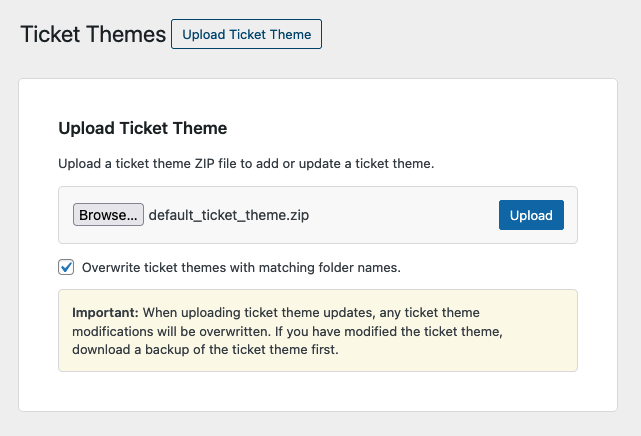
Previously, updating a ticket theme often meant replacing files manually using FTP. That worked, but it was not ideal for many users and made theme maintenance more technical than it needed to be.
With FooEvents for WooCommerce version 2.0.0, updating ticket themes is now much easier thanks to the new upload and overwrite workflow. This makes it simpler to install new ticket theme versions, apply updates, and keep themes aligned with the latest FooEvents features.
New Ticket Theme Version Notices
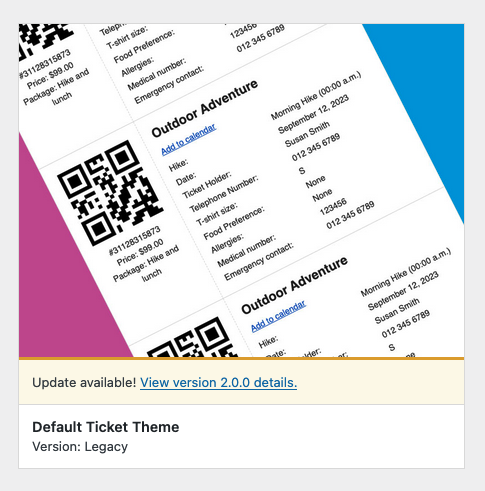
Alongside the new update workflow, we have also added ticket theme version notices.
These notices help identify when a ticket theme may be out of date, making it easier to spot when an update is needed. This gives store owners better visibility into the state of their ticket themes and helps reduce the chance of running outdated templates for longer than intended.
PDF Ticket Folder Protection
FooEvents PDF tickets use an “unlisted link” model, similar to Google Drive’s “anyone with the link” sharing setting. Ticket file names are generated using an algorithm that produces obscure, non-sequential names, making them extremely difficult to guess, even if someone understands how FooEvents generates them.
That said, you can never be too safe to we have introduced a new advanced feature that adds additional protection to PDF ticket folders, helping reduce the chance of direct access to generated ticket files.
Updated DOMPDF Library
This release also includes an updated DOMPDF library.
Keeping core PDF-generation dependencies up to date is important for stability, rendering accuracy, compatibility, and security. By updating DOMPDF, this update strengthens the PDF ticket generation stack and helps ensure it remains compatible with modern server environments and future improvements.
Some ticket themes require minor updates to ensure compatibility with this version. You can read more about it here.
We’d Love Your Feedback
This is an important release for FooEvents, and we would love your feedback.
If you test the new Attendee Details Page or the updated ticket theme workflow, let us know what works well, and what you would like to see improved. That feedback will help shape the next phase of FooEvents.
 English
  German
  Dutch
Dutch  Spanish
  Italian
  Portuguese
  French
  Polish
  Czech
Czech  Greek
Greek